
Restore Tests#
Introduction#
A Restore Test is the central configuration object in Restore Verification. It connects the backup source, Restore Destination, verification method, Verification Rules, Restore Policy, and Bacula Restore Job into a single test workflow.
In Bacula, each Restore Test is represented by an Admin Job with the same name as the Restore Test. When this Admin Job is started, the Restore Test workflow begins, the selected data is restored, and the restored data is then verified.
What a Restore Test contains#
A Restore Test brings together the following configuration elements:
backup source and restore point selection,
verification method,
Verification Rules,
restore scope,
Restore Destination,
Restore Policy,
Bacula Restore Job,
advanced connection and Admin Job settings.
Configuration#
Restore Tests can be configured on the following page:
[Main menu] => [Page: Jobs] => [Tab: Restore Verification] => [SubTab: Restore Tests]
Basic options#
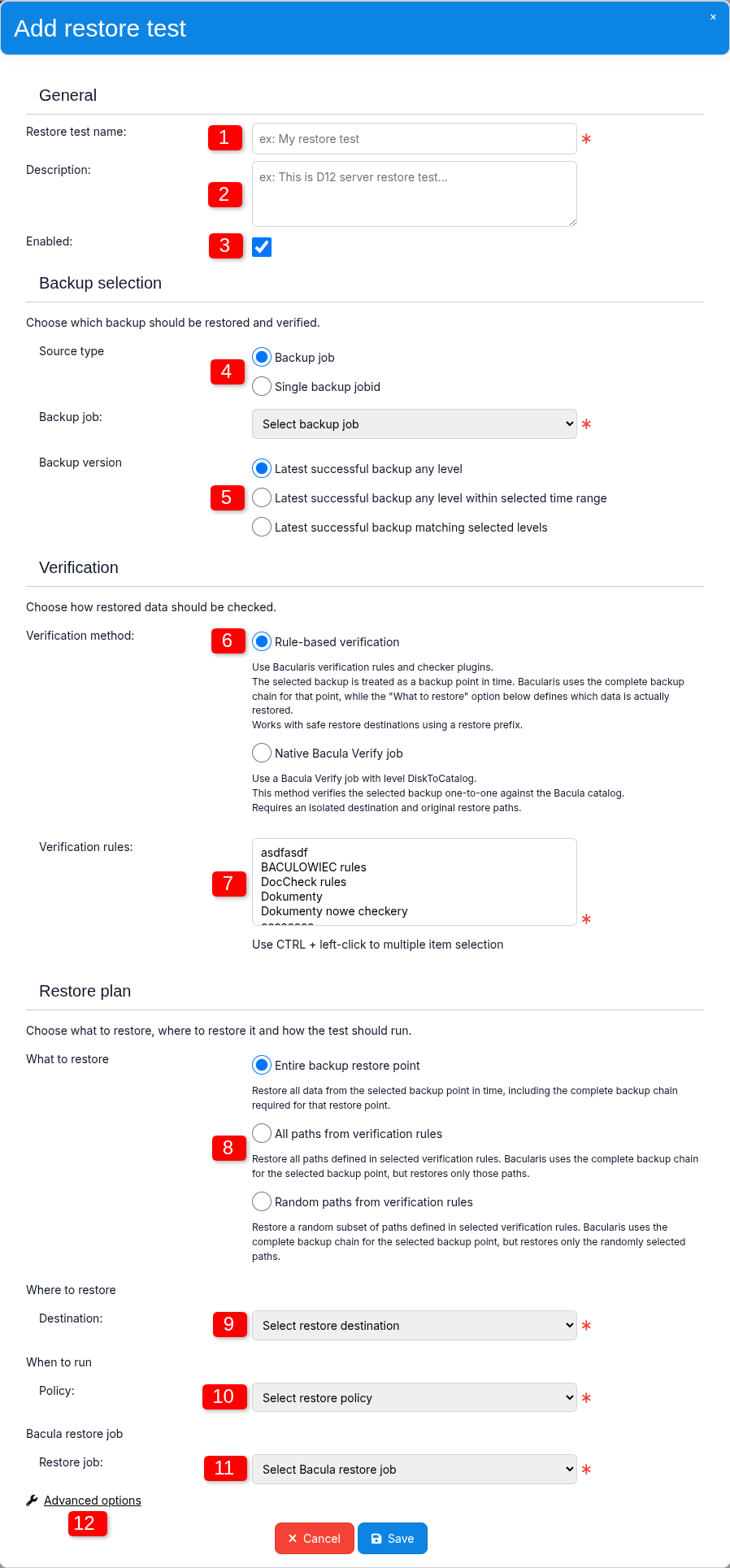
1. Restore test name#
Defines the name of the Restore Test.
The same name is also used for the Bacula Admin Job that represents the Restore Test and is created together with it.
2. Description#
An optional description of the Restore Test. It can be used to provide additional information about the purpose of the test.
3. Enabled#
Defines whether the Restore Test is enabled.
This option can be used to temporarily disable a Restore Test without removing its configuration.
4. Source type#
Defines the source of the backup data that should be tested.
Two source types are available:
Backup job - the Restore Test dynamically selects a backup
JobIdbelonging to the selected Backup Job according to the Backup version setting. The Backup version option is available only when Backup job is selected.Single backup jobid – the Restore Test always uses one specific backup
JobId.
5. Backup version#
This option is available when Backup job is selected as the source type.
Backup version defines how Bacularis selects the restore point to be tested from the available successful backups of the selected Backup Job.
Depending on the selected mode, Bacularis can use:
the latest successful backup regardless of level,
the latest successful backup within a selected time range,
the latest successful backup matching selected backup levels.
6. Verification method#
This is one of the most important Restore Test options because it determines how the restored data will be verified.
The verification can be performed either by Bacularis using Verification Rules and checker plugins, or by Bacula using a native Verify Job.
The selected verification method also affects which other Restore Test options are available. For example, Verification Rules and multiple restore scope modes are available only with Rule-based Verification.
7. Verification Rules#
Defines the Verification Rules used to check the restored data.
One or more Verification Rules can be selected.
This option is available only when Rule-based Verification is selected as the verification method.
Disabled Verification Rules can remain assigned to the Restore Test, but they are skipped during execution until they are enabled again.
8. What to restore#
Defines which data should be restored from the selected backup.
For Rule-based Verification, the following restore scopes are available:
Entire backup restore point
All paths from Verification Rules
Random paths from Verification Rules
For Native Bacula Verify, only the following mode is available:
Selected backup only
9. Where to restore#
Defines the Restore Destination used by the Restore Test.
The Restore Destination specifies the test environment where backup data will be restored and where verification will be performed.
10. When to run#
Defines the Restore Policy assigned to the Restore Test.
The Restore Policy controls automatic execution behavior. Regardless of the selected policy, the Restore Test can also be started manually by running its corresponding Admin Job.
11. Bacula restore job#
Defines the Bacula Restore Job used by the Restore Test workflow.
A dedicated Restore Job can be used for Restore Verification, and the same Restore Job can be shared by multiple Restore Tests.
12. Advanced options#
Advanced options contain settings that are usually inherited from the default Bacularis configuration but may need to be adjusted in environments with a different web access configuration or custom Bacula Admin Job requirements.
Advanced options#
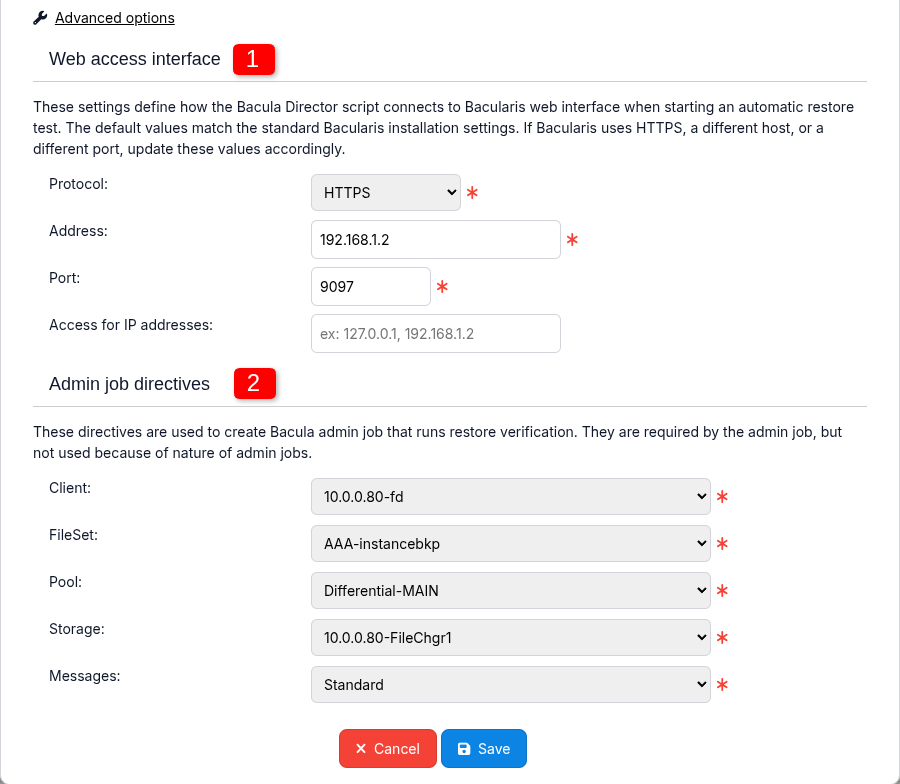
1. Web access interface#
These settings define where and how the Bacularis Restore Verification script running from the Bacula Director environment connects to the Bacularis web interface.
The configured protocol, address, and port must be reachable from the Bacula Director host.
In many installations, the Bacula Director and Bacularis web interface
may run on the same host. In such cases, a local address such as
127.0.0.1 may be used, or the default values may already be suitable.
The protocol may also need to be adjusted depending on whether the
Bacularis web interface uses HTTP or HTTPS.
The optional Access for IP addresses setting restricts which source IP addresses are allowed to use the web access interface.
The connection direction can be represented as:
Bacula Director → Bacularis Web Interface
Note
For improved security, it is recommended to restrict Access for IP addresses to the Bacula Director host. In Restore Verification, Web Access requests are sent from the Director side, so allowing only its IP address limits token use to the expected source.
2. Admin job directives#
These settings define the Bacula directives used when creating the Admin Job that represents the Restore Test.
Bacula requires these directives to be present in an Admin Job definition, even though they are not used by the Restore Verification workflow itself.
How a Restore Test works#
A Restore Test is started by running the Bacula Admin Job that represents the test. The way this Admin Job is started depends on the Restore Policy assigned to the Restore Test.
After the Restore Test starts, the selected verification method determines the workflow that will be used.
With Rule-based Verification, the Admin Job starts the Restore Test workflow, which restores the selected data to the configured Restore Destination. The restored data is then checked against the configured criteria using checker plugins.
The final Restore Test report is written to the Restore Job log.
With Native Bacula Verify, the Admin Job starts a Restore Job
that restores the selected backup data to the Restore Destination.
After the restore completes, a Bacula Verify Job with the
DiskToCatalog level is started.
The Verify Job compares the attributes of the restored files with
the metadata stored in the Bacula Catalog for the selected backup
JobId.
The verification result is available in the Verify Job log as a standard Bacula Verify report.
Test result#
The Restore Test result is reflected in the status of the Bacula Job that performs the final verification step. The exact Job depends on the selected verification method.
Rule-based Verification - the final result is reflected in the Restore Job status. If all verification checks pass, the Restore Job finishes successfully. If at least one check fails, the Restore Job finishes with an error status.
Native Bacula Verify - the final result is reflected in the Verify Job status. If verification completes without differences, the Verify Job finishes successfully. If differences are detected, the Verify Job finishes with the
Verify Differencesstatus.
Example test output#
Successful
The following example shows part of a successful Rule-based Verification Restore Test log:
ubuntu-fd JobId 106: ClientAfterJob: [INFO] ===> CHECKER: FileExistsCheck
ubuntu-fd JobId 106: ClientAfterJob: [INFO]        TEST: PASSED
ubuntu-fd JobId 106: ClientAfterJob: [INFO]        PATH: /opt/bacula/bin/bdirjson
ubuntu-fd JobId 106: ClientAfterJob: [INFO]        OPERATOR: ==
ubuntu-fd JobId 106: ClientAfterJob: [INFO]        CURRENT: true
ubuntu-fd JobId 106: ClientAfterJob: [INFO]        EXPECTED: true
ubuntu-fd JobId 106: ClientAfterJob: [INFO]
ubuntu-fd JobId 106: ClientAfterJob: [INFO] ===> CHECKER: FileSizeCheck
ubuntu-fd JobId 106: ClientAfterJob: [INFO]        TEST: PASSED
ubuntu-fd JobId 106: ClientAfterJob: [INFO]        PATH: /opt/bacula/bin/bdirjson
ubuntu-fd JobId 106: ClientAfterJob: [INFO]        OPERATOR: >
ubuntu-fd JobId 106: ClientAfterJob: [INFO]        CURRENT: 537248
ubuntu-fd JobId 106: ClientAfterJob: [INFO]        EXPECTED: 0

ubuntu-fd JobId 106: ClientAfterJob: [INFO] All checks in "rt-a8HuGn5WLECIVQSpJvPixFscXNkZ01U2" restore test passed SUCCESSFULLY.

  Termination:            Restore OK
Failed
The following example shows part of a failed Rule-based Verification Restore Test log:
ubuntu-fd JobId 108: ClientAfterJob: [INFO] ===> CHECKER: FileExistsCheck
ubuntu-fd JobId 108: ClientAfterJob: [INFO]        TEST: PASSED
ubuntu-fd JobId 108: ClientAfterJob: [INFO]        PATH: /opt/bacula/bin/bdirjson
ubuntu-fd JobId 108: ClientAfterJob: [INFO]        OPERATOR: ==
ubuntu-fd JobId 108: ClientAfterJob: [INFO]        CURRENT: true
ubuntu-fd JobId 108: ClientAfterJob: [INFO]        EXPECTED: true
ubuntu-fd JobId 108: ClientAfterJob: [INFO]
ubuntu-fd JobId 108: ClientAfterJob: [ERROR] ===> CHECKER: FileSizeCheck
ubuntu-fd JobId 108: ClientAfterJob: [ERROR]        TEST: FAILED
ubuntu-fd JobId 108: ClientAfterJob: [ERROR]        PATH: /opt/bacula/bin/bdirjson
ubuntu-fd JobId 108: ClientAfterJob: [ERROR]        OPERATOR: ==
ubuntu-fd JobId 108: ClientAfterJob: [ERROR]        CURRENT: 537248
ubuntu-fd JobId 108: ClientAfterJob: [ERROR]        EXPECTED: 0

ubuntu-fd JobId 108: ClientAfterJob: [ERROR] Test "rt-1E4dOeTl2chBAmMbKk0YynJsWiFtap85" FAILED.

  Termination:            *** Restore Error ***
Editing and disabling a Restore Test#
A Restore Test can be temporarily disabled without removing its configuration. When disabled, automatic execution is skipped, while the configuration remains available for later use.