
Restore Policies#
Introduction#
A Restore Policy is a reusable Restore Verification configuration object that defines when and how Restore Tests are started. It is the main configuration object responsible for automating Restore Test execution.
Configuration#
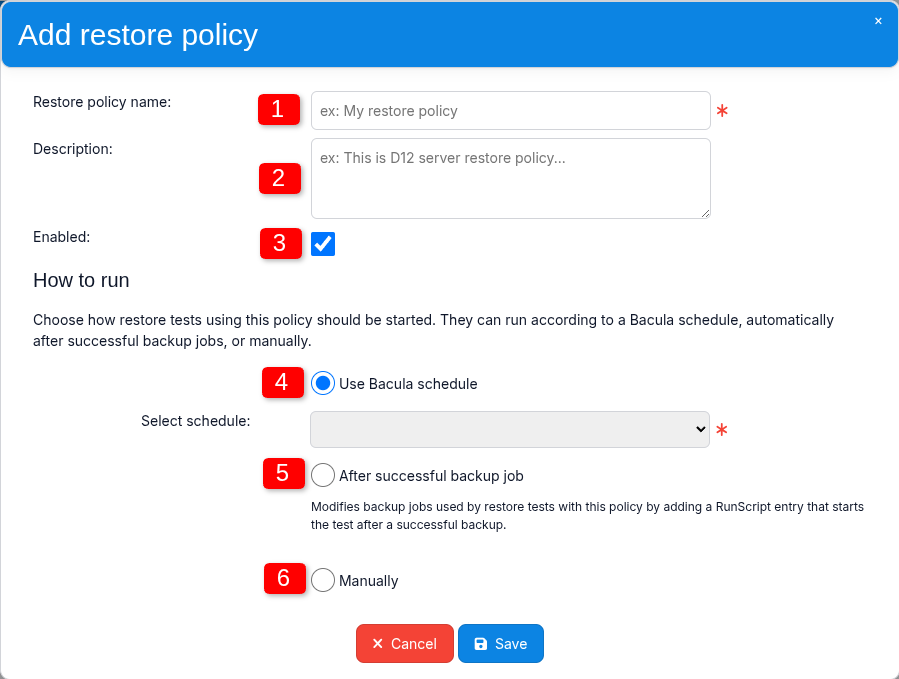
1. Restore policy name#
Defines the name of the Restore Policy.
2. Description#
An optional description of the Restore Policy. It can be used to provide additional information about the policy use.
3. Enabled#
This option controls automatic execution through the Restore Policy.
When the policy is disabled, Restore Tests that use it are no longer started automatically, but they can still be run manually through their Admin Jobs.
When Enabled is turned on again, automatic execution resumes according to the configured policy mode.
The Manually mode is an exception because it intentionally provides no automatic execution, regardless of the Enabled state.
4. Use Bacula schedule#
This mode allows you to select a Bacula Schedule that will automatically start Restore Tests using the Restore Policy.
A single Schedule can be shared by multiple Restore Tests that reference the same Restore Policy.
This mode is independent of backup Job completion. Restore Tests are started according to the selected Bacula Schedule. In other words, Restore Test execution is decoupled from backup Job execution.
5. After successful backup job#
With this mode, a Restore Test is started after the associated backup Job completes successfully.
If several Restore Tests associated with the same backup Job use this Restore Policy, each configured Restore Test can be started after the successful backup according to its configuration.
You can also define which backup levels should trigger Restore Tests. For example, Restore Tests can be configured to run after every Full backup while being skipped after Incremental and Differential backups.
This mode modifies the existing backup Job configuration by adding an additional RunScript entry using RunsAfter. The RunScript starts the Restore Test after the backup completes successfully.
A corresponding RunScript entry is added to each backup Job that is associated, through a Restore Test, with a Restore Policy using this execution mode.
6. Manually#
This mode disables automatic Restore Test execution.
No automatic trigger is configured. A Restore Test can be started only by manually running the corresponding Admin Job.
One policy, multiple Restore Tests#
A single Restore Policy can be assigned to any number of Restore Tests. This allows the same execution rules to be defined once and reused across multiple tests.
Each Restore Test references one Restore Policy, while one Restore Policy can be referenced by many Restore Tests.
Choosing a policy type#
Mode |
Automatic |
Trigger |
|---|---|---|
Use Bacula schedule |
Yes |
Bacula Schedule |
After successful backup job |
Yes |
Successful backup Job |
Manually |
No |
Admin Job started manually |