
InfluxDB 2.x backup plugin#
This Bacularis plugin enables backing up and restoring InfluxDB 2.x data.
Core features#
The Bacularis InfluxDB 2.x backup plugin provides the following functionality:
Native InfluxDB 2.x backups
Full instance backups
Backups of all buckets or selected buckets
Restoring selected buckets directly to InfluxDB
Line Protocol offline exports
Export of InfluxDB reference metadata
Restore of backup data to the local file system
Backup methods#
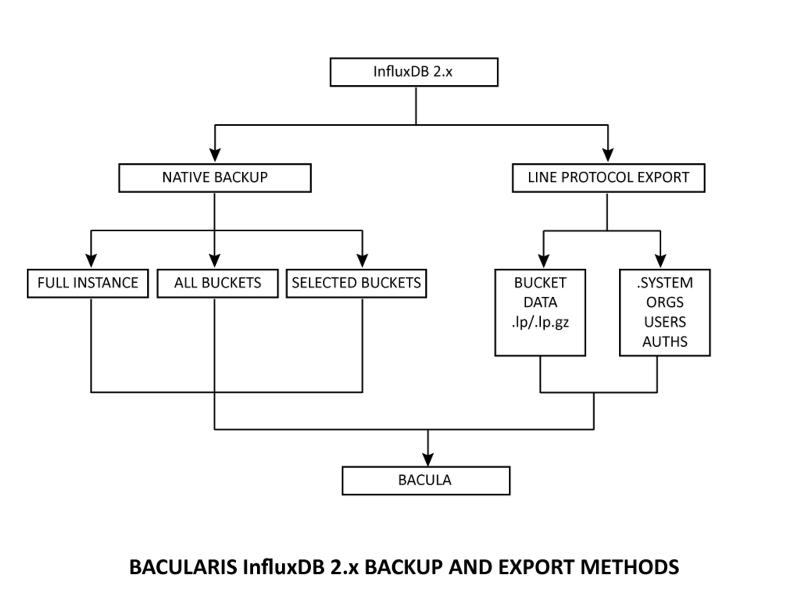
The plugin supports two independent InfluxDB 2.x backup methods:
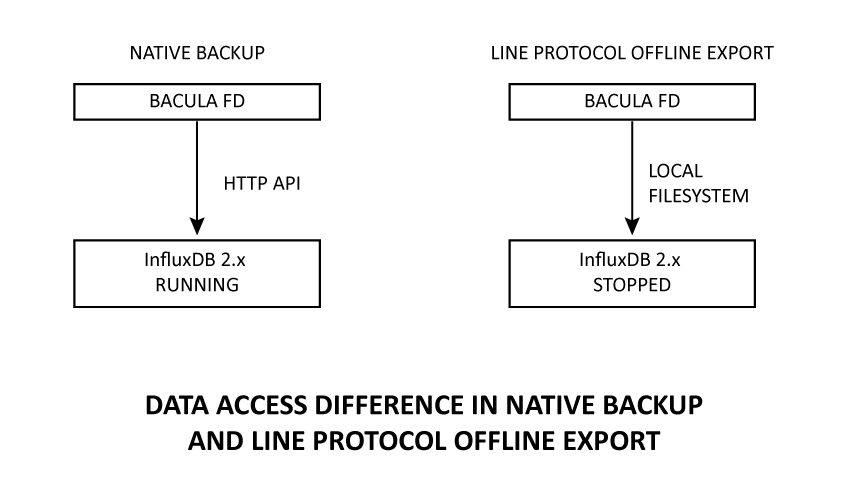
Native backup method - uses the native InfluxDB backup format and tools. It is an online backup method and can be used while the InfluxDB server is running. It is intended primarily for backup and restore of InfluxDB 2.x environments. The following backup variants are available:
Full Instance - backs up the complete InfluxDB instance, including database data and instance metadata.
All Buckets One Archive - backs up all buckets from the configured organization and stores them together in one archive.
All Buckets Separately - backs up all buckets from the configured organization, storing each bucket as a separate backup object.
Selected Buckets - backs up only buckets explicitly selected by the administrator.
Line Protocol offline export - exports bucket data in InfluxDB Line Protocol format using the local InfluxDB storage files. It is an offline method and requires the InfluxDB server to be stopped before the export is performed. Each bucket is exported separately. Optionally, reference information about organizations, users and authorizations can also be included in the backup.
The two methods are independent and can be enabled separately or used together in the same backup configuration.
The Native backup method is intended primarily for InfluxDB 2.x backup and recovery without stopping the database server. Line Protocol offline export provides a portable representation of bucket data that can also be useful when preparing data for migration or import into another InfluxDB environment.
General requirements#
To use the InfluxDB 2.x backup plugin, the following components are required:
Bacularis web interface in version
7.1.0or greater.Bacularis API in version
7.1.0or greater installed on the Bacula File Daemon host where the InfluxDB backup operations are performed.InfluxDB 2.x server tools available on the Bacula File Daemon host, including the
influxdbinary.InfluxDB CLI installed on the Bacula File Daemon host. The CLI provides the
influxcommand used by the plugin.
tararchiving utility for Native backups.Bacula File Daemon with the Bacula
bpipeplugin installed.Access from the Bacula File Daemon host to the InfluxDB 2.x instance used for Native backup and restore operations.
Local access to the InfluxDB storage files when using Line Protocol offline export.
If the Bacularis web interface, Bacularis API, Bacula File Daemon and InfluxDB server are installed on the same host, a single Bacularis installation can provide both the web interface and API.
Line Protocol offline export works directly with the local InfluxDB storage files. Therefore, this backup method is intended for an InfluxDB instance located on the same host as the Bacula File Daemon.
Prepare environment#
Before configuring the InfluxDB 2.x backup plugin, make sure that the Bacula File Daemon host has the required InfluxDB tools, file permissions and access to the InfluxDB instance or local storage paths used by the selected backup method.
Bacula BPIPE plugin#
Check whether the Bacula File Daemon used for the InfluxDB backup has the
bpipe plugin installed. You can verify it using the status client=xxx
Bconsole command or directly in Bacularis.
Example:
*status client=debian-fd
Connecting to Client debian-fd at localhost:9102

debian-fd Version: 15.0.3
...
Plugin: bpipe-fd.so(2)
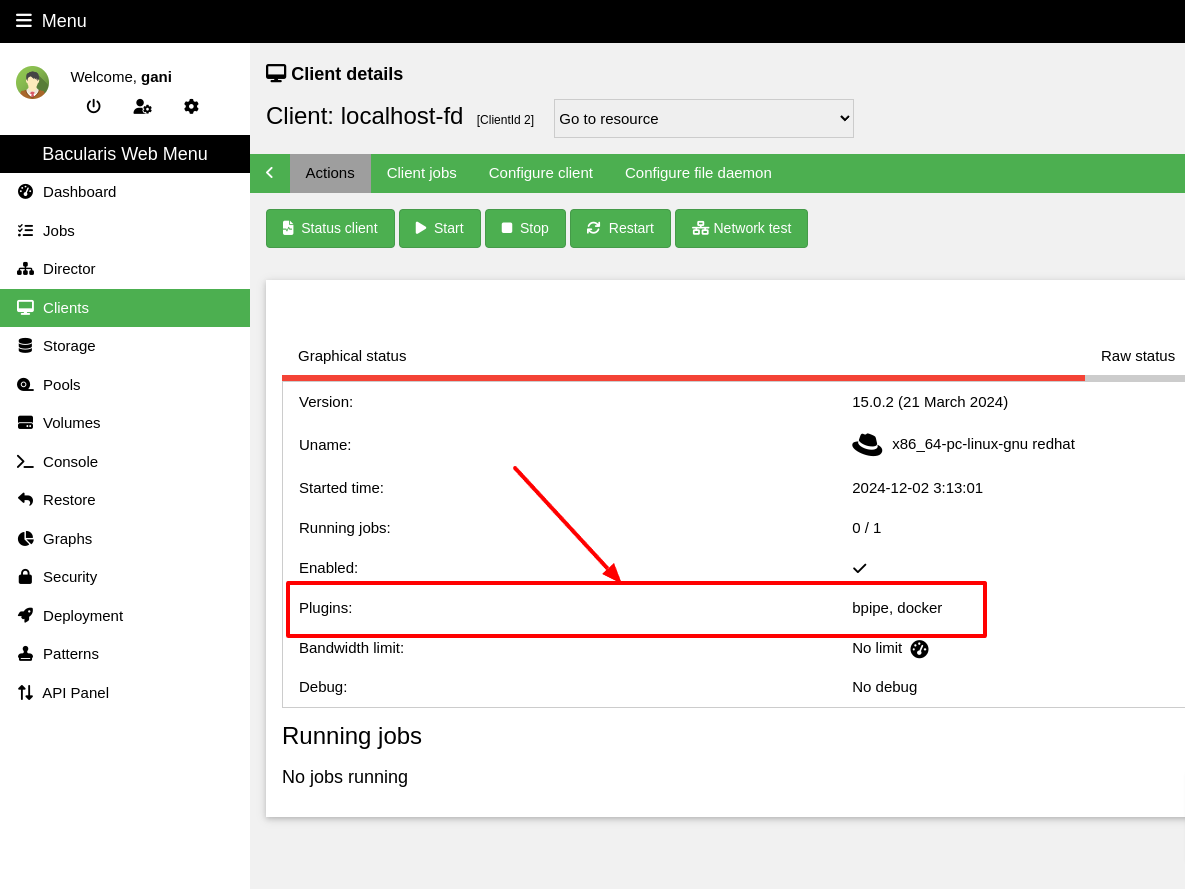
IMPORTANT NOTE: Bacula versions 15.0.0 - 15.0.2 contain a bpipe
plugin bug that may cause the Bacula File Daemon to crash after backup. See
how to solve it: File daemon crashes after running Bacularis plugins (MySQL, MariaDB, PostgreSQL, MSSQL…).
InfluxDB tools#
The plugin uses the official InfluxDB command line tools for backup, restore and offline data export.
The following programs are required:
influx- the InfluxDB CLI used for communication with a running InfluxDB instance and for Native backup and restore operations.
influxd- the InfluxDB server binary also used for Line Protocol offline export and access to InfluxDB recovery information.
The InfluxDB server and InfluxDB CLI are distributed as separate packages.
Installing the InfluxDB server does not necessarily install the influx
command. Make sure that the InfluxDB CLI is installed separately if it is not
already available.
If the official InfluxData repository is configured, the InfluxDB CLI can typically be installed on DEB-based systems with:
apt install influxdb2-cli
On RPM-based systems:
dnf install influxdb2-cli
You can verify that both required commands are available with:
influx version
influxd version
By default, the plugin expects both binaries in /usr/bin. A different
directory can be configured using the InfluxDB binaries path plugin
option.
Native backup operations connect to the InfluxDB server using its HTTP API. The default address is:
http://127.0.0.1:8086
The connection requires an InfluxDB token and, for bucket-oriented operations, an organization name.
Permissions#
The system account running the Bacula File Daemon must have sufficient permissions to execute the InfluxDB tools and access all paths required by the selected backup method.
For Native backup, the account must be able to create directories and files inside the configured common backup directory.
For Line Protocol offline export, the account must be able to read the local InfluxDB engine files. If reference metadata export is enabled, it must also be able to read the InfluxDB BoltDB metadata file.
Typical default paths are:
/var/lib/influxdb/engine
/var/lib/influxdb/influxd.bolt
The actual paths depend on the InfluxDB installation and can be changed in the plugin configuration.
Line Protocol offline export preparation#
Line Protocol export is an offline backup method. The InfluxDB server must be stopped cleanly before the backup job starts.
For example, on a systemd-based installation:
systemctl stop influxdb
The plugin does not stop or start the InfluxDB service automatically. Service
lifecycle management remains under administrator control and can be handled
manually or, if appropriate for the environment, using Bacula RunScript
directives.
A clean InfluxDB shutdown is important because Line Protocol export reads the
local TSM and WAL files directly. Reference metadata export also reads the
InfluxDB BoltDB file using the influxd recovery tools.
It is recommended to enable WAL flushing on shutdown in the InfluxDB configuration:
storage-wal-flush-on-shutdown = true
This setting helps prepare the storage for an offline export. It does not mean that the WAL directory must be empty after shutdown.
After the backup job finishes, the InfluxDB service can be started again:
systemctl start influxdb
Backup#
Before using the InfluxDB 2.x backup plugin, you need to prepare the plugin
configuration and use it in the Bacula FileSet resource.
This consists of two steps:
Create an InfluxDB 2.x backup plugin configuration.
Use this configuration in the Bacula
FileSetPlugindirective.
The plugin configuration can be created in the same place as other Bacularis
plugin configurations, on the Add-ons page in the Plugins tab.
It can also be created directly while editing the Bacula FileSet resource
by using the Add plugin option. In this case, creating the plugin
configuration and adding it to the FileSet is done in one step.
The plugin configuration window is available from the Add plugin option:
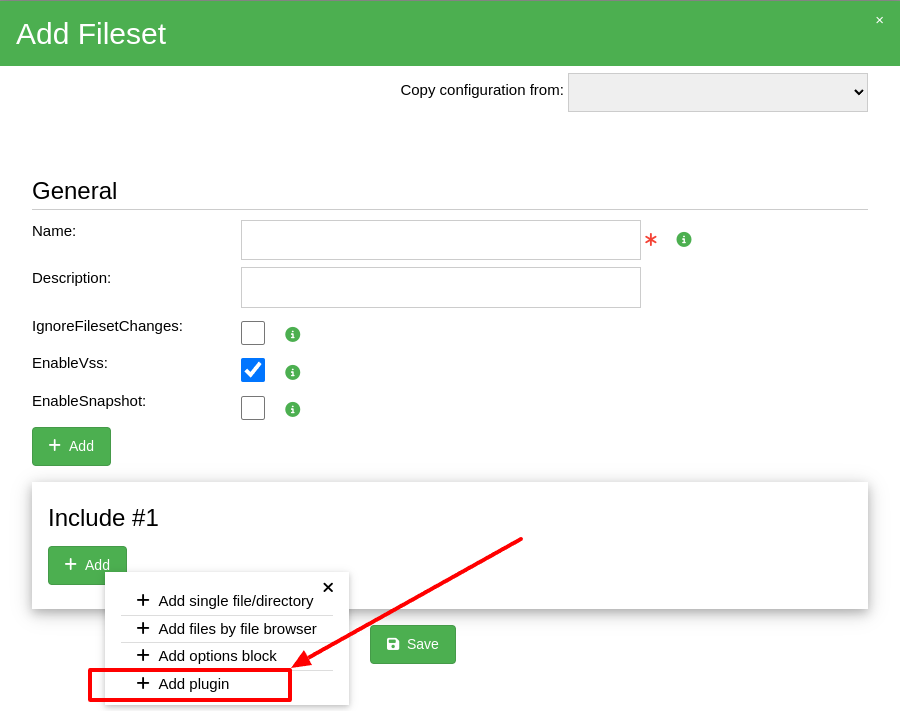
After selecting Add plugin, choose the InfluxDB 2.x backup plugin and
prepare the configuration according to the selected backup method.
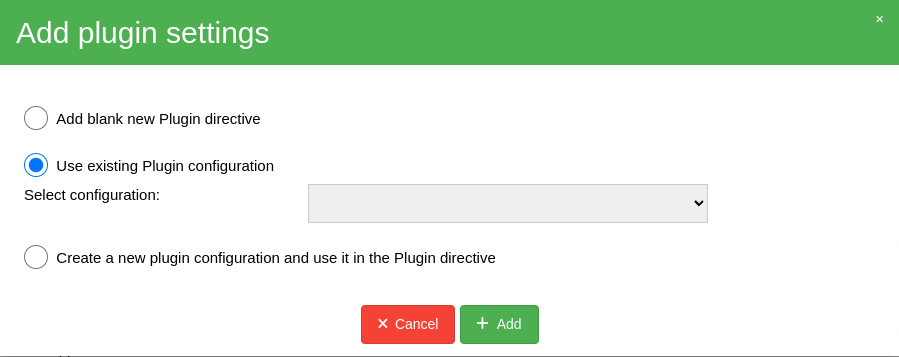
NOTE: After adding the Plugin directive, remember to save the
FileSet resource.
The InfluxDB 2.x backup plugin can use the Native backup method, the Line Protocol offline export method, or both methods in the same plugin configuration.
Restore#
InfluxDB backup data can be restored in two ways:
directly to an InfluxDB 2.x instance, if the selected backup type supports direct restore,
to the local file system for manual recovery, migration or further processing.
The available restore method depends on the type of backup data.
Restore to InfluxDB#
To restore supported Native backup data directly to an InfluxDB 2.x instance,
select Restore to original location in the Bacularis restore wizard.
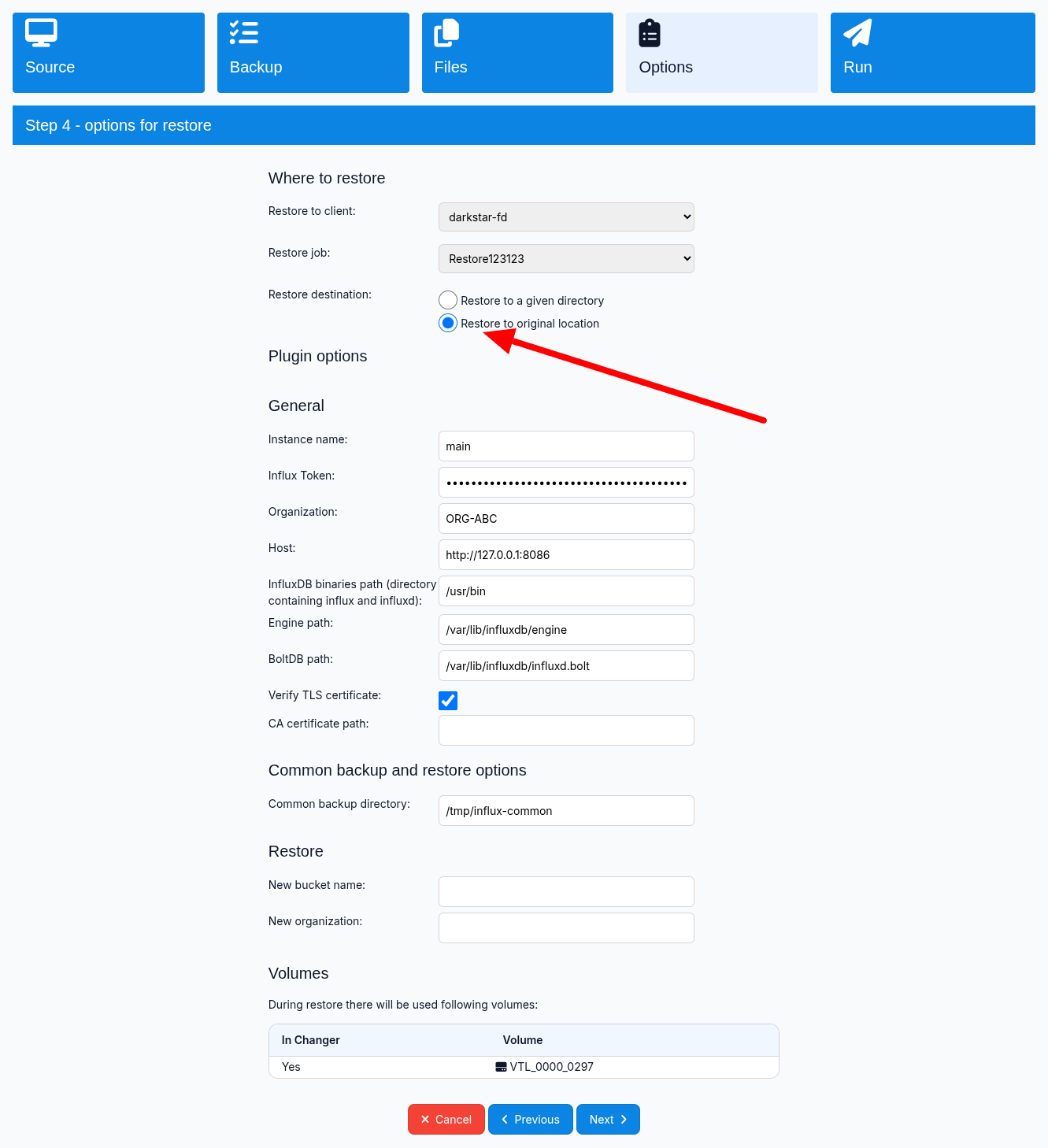
This restore mode is supported for bucket-oriented Native backups. Depending on the selected backup data, the plugin can restore a bucket using its original name or a new bucket name configured in the restore options.
Direct Full Instance restore is intentionally not supported by the plugin. Full Instance backups should first be restored to the local file system and then used for a manual disaster recovery procedure.
Line Protocol backups are not imported directly into InfluxDB by the plugin. They should be restored to files and imported manually if needed.
Restore to files#
To restore plugin backup data in file form, select Restore to a given
directory in the Bacularis restore wizard. This option is selected by
default.
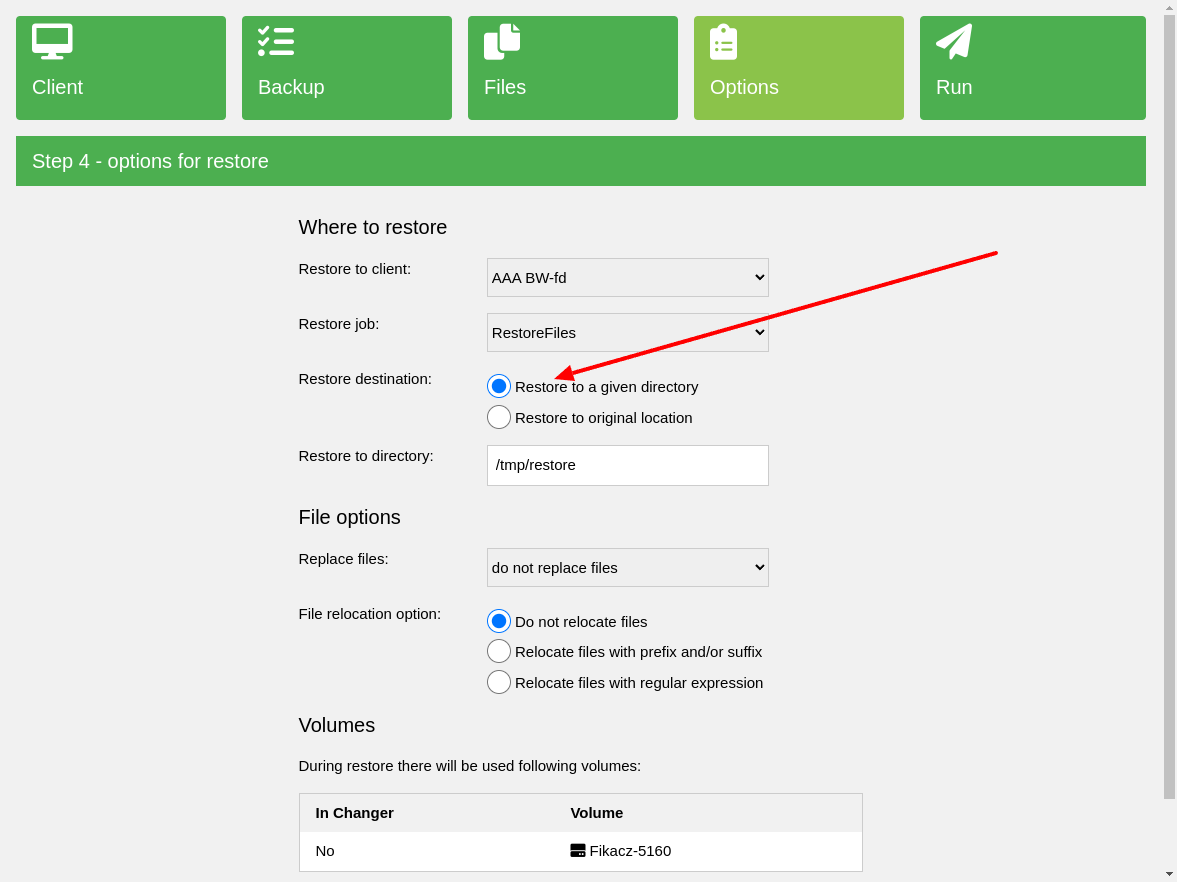
File restore is supported for both Native backup data and Line Protocol exports.
Native backup archives are restored as files that can be used for manual recovery or disaster recovery procedures.
Line Protocol exports are restored as .lp or .lp.gz files and can be
used for manual import into an InfluxDB environment.
Common configuration#
The plugin provides common settings used by one or more InfluxDB backup and restore methods.
Some parameters are required only for a specific backup method. For example, Native backup communicates with a running InfluxDB instance, while Line Protocol offline export works directly with local InfluxDB storage files.
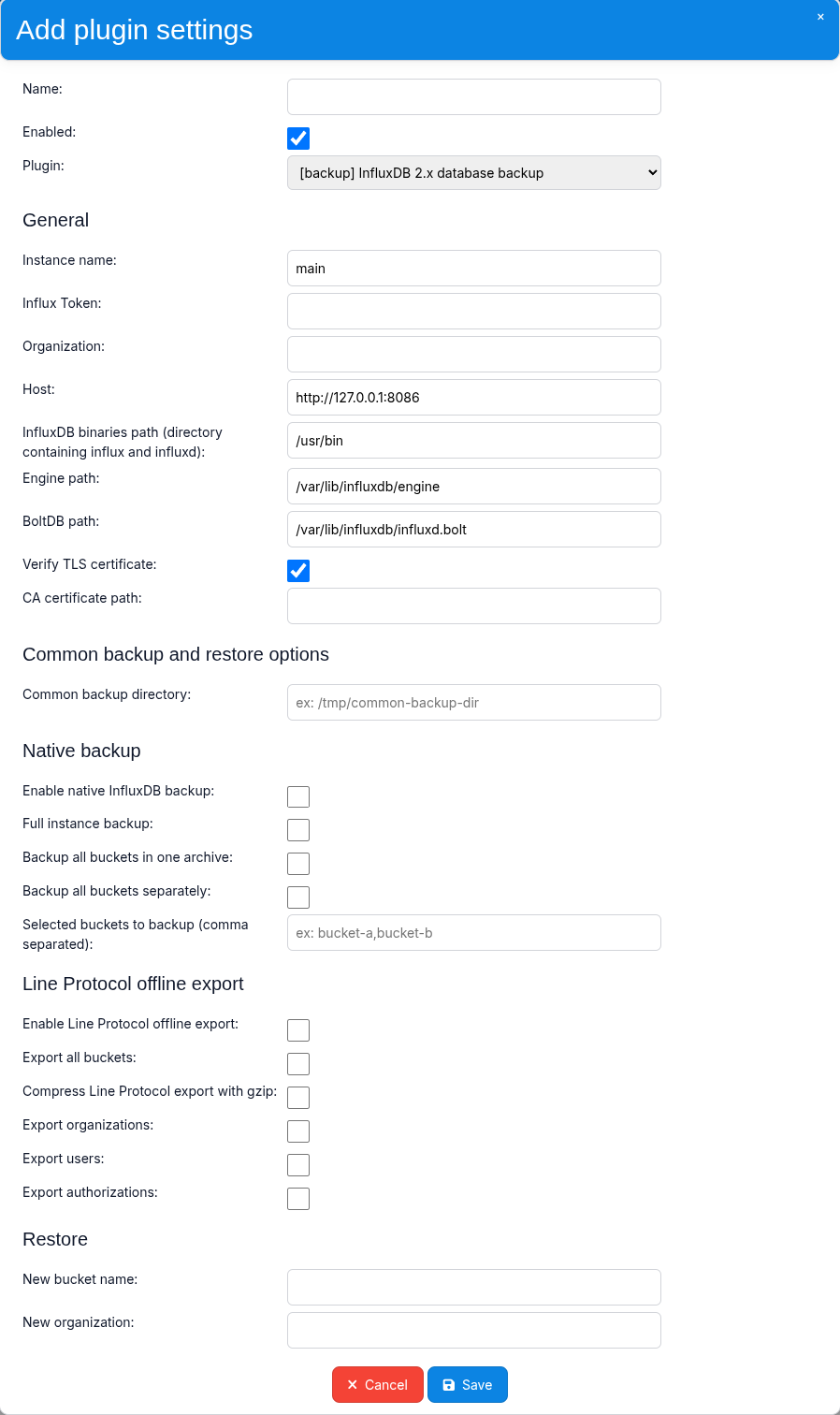
General parameters#
Name |
Parameter |
Description |
Required |
|---|---|---|---|
Instance name |
|
User-defined name of the InfluxDB instance. It is used to identify the instance in the backup data tree. It does not need to match any InfluxDB server-side name. |
No |
Influx Token |
|
InfluxDB authentication token used for Native backup and restore operations. The token must have sufficient permissions for the configured operations. |
Native backup |
Organization |
|
InfluxDB organization used by bucket-oriented Native backup and restore operations. |
Depending on method |
Host |
|
Address of the InfluxDB 2.x server used for online Native backup and restore operations. |
No |
InfluxDB binaries path |
|
Directory containing the |
No |
Engine path |
|
Path to the local InfluxDB storage engine. It is used by Line Protocol offline export to access TSM and WAL data. |
Line Protocol |
BoltDB path |
|
Path to the InfluxDB BoltDB metadata file. It is used when exporting reference metadata such as organizations, users and authorizations. |
Reference metadata |
Verify TLS certificate |
|
Enables TLS certificate verification when connecting to an InfluxDB server over HTTPS. |
No |
CA certificate path |
|
Path to a custom Certificate Authority certificate used to verify the InfluxDB server certificate. |
No |
Restore parameters#
The following parameters are used when restoring supported Native backup data directly to an InfluxDB 2.x instance.
Name |
Parameter |
Description |
Required |
|---|---|---|---|
New bucket name |
|
Restores a single Native bucket backup using a different bucket name. If this option is empty, the original bucket name is used. |
No |
New organization |
|
Restores supported Native bucket backup data to a different InfluxDB organization. If this option is empty, the organization defined in the general plugin settings is used. |
No |
The New bucket name option is intended for restoring a single bucket.
It should not be used when restoring a backup containing multiple buckets.
The restore target must already provide valid InfluxDB connection credentials and sufficient permissions to create and restore the requested buckets.
Native backup method#
The Native backup method uses the official InfluxDB 2.x backup and restore functionality.
It is an online backup method, which means that the InfluxDB server remains running while the backup is performed. This makes the Native method suitable for regular production backups where stopping the database service is not desirable.
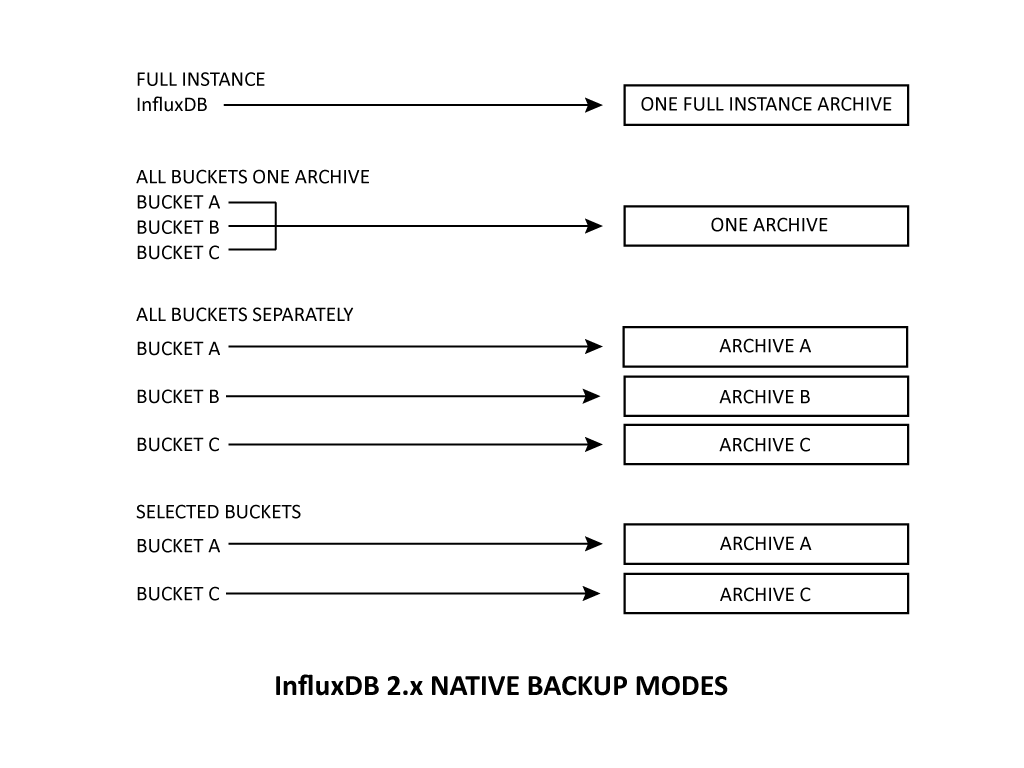
The plugin supports the following Native backup variants:
Full Instance - backs up the complete InfluxDB 2.x instance.
All Buckets One Archive - backs up all buckets from the configured organization and stores them in one backup archive.
All Buckets Separately - backs up all buckets from the configured organization as separate backup objects.
Selected Buckets - backs up only explicitly selected buckets.
All Native backup variants use the configured common backup directory as a working location before the backup data is streamed to Bacula.
The plugin does not automatically remove data created in the common backup directory. The administrator is responsible for managing and cleaning this location when needed.
Levels#
The Native backup method supports the following Bacula backup level:
Full- backs up all data covered by the selected Native backup variant.
Incremental and Differential levels are not supported by the Native
backup method.
Requirements#
Before using the Native backup method, make sure that the Bacula File Daemon host meets the following requirements:
InfluxDB CLI with the
influxcommand installed.
tararchiving utility installed.Bacula
bpipeplugin installed in the Bacula File Daemon.Network access from the Bacula File Daemon host to the InfluxDB 2.x HTTP API.
A valid InfluxDB authentication token with permissions required by the selected backup and restore operations.
A writable common backup directory with enough free disk space for Native backup working data.
For bucket-oriented backup variants, an InfluxDB organization must also be configured.
The InfluxDB server should remain running during Native backup operations. Unlike Line Protocol offline export, the Native backup method does not require stopping the InfluxDB service.
Full Instance#
Description#
The Full Instance backup creates a Native backup of the complete InfluxDB 2.x instance.
This backup type is intended primarily for disaster recovery and full instance reconstruction. It includes the InfluxDB data and metadata required by the native InfluxDB full restore procedure.
The backup is created while the InfluxDB server is running.
The resulting Native backup directory is archived into a single TAR file and sent to Bacula.
Backup data structure#
An example Full Instance backup can look as follows:
/
/#InfluxDB2Backup
/#InfluxDB2Backup/INFLUX-CONFIG
/#InfluxDB2Backup/INFLUX-CONFIG/default
/#InfluxDB2Backup/INFLUX-CONFIG/default/main
/#InfluxDB2Backup/INFLUX-CONFIG/default/main/full-instance-123-2026-10-21_020000-Full.tar
The path components have the following meaning:
INFLUX-CONFIG- Bacularis plugin configuration name.
default- organization component used in the backup tree. For Full Instance backup, the backup itself is not limited to a single organization.
main- user-defined InfluxDB instance name.
full-instance-*-Full.tar- TAR archive containing the complete Native Full Instance backup.
Configuration#
Name |
Parameter |
Description |
Required |
|---|---|---|---|
Enable native InfluxDB backup |
|
Enables the Native InfluxDB backup method. |
Yes |
Full instance backup |
|
Enables Full Instance Native backup. |
Yes |
Common backup directory |
|
Directory used as a working location for Native backup data before it is archived and streamed to Bacula. |
Yes |
Performing restore#
Direct Full Instance restore to InfluxDB is intentionally not performed by the plugin.
To recover a Full Instance backup, first restore the TAR archive to the local
file system using the Bacularis restore wizard and the Restore to a given
directory option.
After restoring the archive, extract it and perform the InfluxDB full restore manually according to the InfluxDB disaster recovery procedure.
A typical restore workflow is:
1. Restore the Full Instance TAR archive from Bacula.
2. Extract the archive to a local directory.
3. Prepare a destination InfluxDB 2.x instance.
4. Obtain or create an operator token required by the native full restore.
5. Run the InfluxDB full restore manually.
For example:
influx restore \
    --host http://127.0.0.1:8086 \
    --full \
    --operator-token OPERATOR_TOKEN \
    /path/to/extracted/backup
Because Full Instance restore affects the complete InfluxDB instance, it should be treated as a disaster recovery operation and performed carefully on the intended target environment.
All Buckets One Archive#
Description#
The All Buckets One Archive backup discovers all buckets in the configured InfluxDB organization and backs them up using the Native InfluxDB backup method.
Each bucket is backed up individually, but all resulting Native bucket backups are stored together in one TAR archive.
This backup type is useful when all buckets from an organization should be protected as one backup object while still using the Native bucket backup format.
The backup is performed online while the InfluxDB server is running.
Backup data structure#
An example All Buckets One Archive backup can look as follows:
/
/#InfluxDB2Backup
/#InfluxDB2Backup/INFLUX-CONFIG
/#InfluxDB2Backup/INFLUX-CONFIG/my-organization
/#InfluxDB2Backup/INFLUX-CONFIG/my-organization/main
/#InfluxDB2Backup/INFLUX-CONFIG/my-organization/main/all-buckets-124-2026-10-21_021500-Full.tar
The path components have the following meaning:
INFLUX-CONFIG- Bacularis plugin configuration name.
my-organization- source InfluxDB organization.
main- user-defined InfluxDB instance name.
all-buckets-*-Full.tar- TAR archive containing Native backups of all buckets discovered in the configured organization.
Configuration#
Name |
Parameter |
Description |
Required |
|---|---|---|---|
Enable native InfluxDB backup |
|
Enables the Native InfluxDB backup method. |
Yes |
Backup all buckets in one archive |
|
Enables backup of all buckets from the configured organization into one archive. |
Yes |
Organization |
|
InfluxDB organization whose buckets should be backed up. |
Yes |
Common backup directory |
|
Directory used as a working location for Native bucket backup data before the final archive is streamed to Bacula. |
Yes |
Performing restore#
All Buckets One Archive backups can be restored either to the local file system or directly to an InfluxDB 2.x instance.
To restore the archive as a file, select Restore to a given directory in
the Bacularis restore wizard.
To restore the bucket data directly to InfluxDB, select Restore to original
location.
During direct restore, the plugin extracts the archive and restores each contained Native bucket backup to the target InfluxDB instance.
The New organization restore option can be used to restore the buckets to
a different InfluxDB organization.
If New organization is not specified, the organization configured in the
plugin settings is used as the restore target.
The archive is processed bucket by bucket. If one bucket restore fails, buckets that have already been restored are not rolled back automatically.
All Buckets Separately#
Description#
The All Buckets Separately backup discovers all buckets in the configured InfluxDB organization and backs up each bucket independently using the Native InfluxDB backup method.
Each bucket is stored as a separate backup object and a separate TAR archive in Bacula.
This backup type is useful when all buckets in an organization should be protected while preserving the ability to select and restore individual buckets independently.
The backup is performed online while the InfluxDB server is running.
Backup data structure#
An example All Buckets Separately backup can look as follows:
/
/#InfluxDB2Backup
/#InfluxDB2Backup/INFLUX-CONFIG
/#InfluxDB2Backup/INFLUX-CONFIG/my-organization
/#InfluxDB2Backup/INFLUX-CONFIG/my-organization/main
/#InfluxDB2Backup/INFLUX-CONFIG/my-organization/main/buckets
/#InfluxDB2Backup/INFLUX-CONFIG/my-organization/main/buckets/system-metrics
/#InfluxDB2Backup/INFLUX-CONFIG/my-organization/main/buckets/system-metrics/bucket-125-2026-10-21_023000-Full.tar
/#InfluxDB2Backup/INFLUX-CONFIG/my-organization/main/buckets/application
/#InfluxDB2Backup/INFLUX-CONFIG/my-organization/main/buckets/application/bucket-125-2026-10-21_023000-Full.tar
/#InfluxDB2Backup/INFLUX-CONFIG/my-organization/main/buckets/monitoring
/#InfluxDB2Backup/INFLUX-CONFIG/my-organization/main/buckets/monitoring/bucket-125-2026-10-21_023000-Full.tar
The path components have the following meaning:
INFLUX-CONFIG- Bacularis plugin configuration name.
my-organization- source InfluxDB organization.
main- user-defined InfluxDB instance name.
buckets- directory containing individual bucket backups.
system-metrics,applicationandmonitoring- source bucket names.
bucket-*-Full.tar- separate Native backup archive for a single bucket.
Because every bucket is represented as a separate Bacula backup object, it can be selected independently in the restore wizard.
Configuration#
Name |
Parameter |
Description |
Required |
|---|---|---|---|
Enable native InfluxDB backup |
|
Enables the Native InfluxDB backup method. |
Yes |
Backup all buckets separately |
|
Discovers all buckets in the configured organization and backs up each bucket as a separate backup object. |
Yes |
Organization |
|
InfluxDB organization whose buckets should be backed up. |
Yes |
Common backup directory |
|
Directory used as a working location for individual Native bucket backups before they are archived and streamed to Bacula. |
Yes |
Performing restore#
Each bucket backup can be restored independently.
To restore a bucket archive as a file, select Restore to a given directory
in the Bacularis restore wizard.
To restore selected bucket backup data directly to InfluxDB, select Restore
to original location.
The New organization restore option can be used to restore the selected
bucket backups to another InfluxDB organization.
When restoring a single bucket, the New bucket name option can also be
used to restore it under a different name.
The New bucket name option should not be used when restoring multiple
bucket backups at the same time.
Selected Buckets#
Description#
The Selected Buckets backup allows the administrator to explicitly define which buckets from the configured InfluxDB organization should be backed up.
Each selected bucket is backed up independently using the Native InfluxDB backup method and stored as a separate TAR archive in Bacula.
This backup type is useful when only part of an InfluxDB organization needs to be protected or when different groups of buckets should be assigned to different Bacula backup jobs or schedules.
The backup is performed online while the InfluxDB server is running.
Before the backup starts, the plugin resolves the configured bucket names in the selected InfluxDB organization. If a selected bucket cannot be found, the backup preparation fails instead of silently skipping it.
Backup data structure#
For example, if the buckets system-metrics and monitoring are selected,
the backup can look as follows:
/
/#InfluxDB2Backup
/#InfluxDB2Backup/INFLUX-CONFIG
/#InfluxDB2Backup/INFLUX-CONFIG/my-organization
/#InfluxDB2Backup/INFLUX-CONFIG/my-organization/main
/#InfluxDB2Backup/INFLUX-CONFIG/my-organization/main/buckets
/#InfluxDB2Backup/INFLUX-CONFIG/my-organization/main/buckets/system-metrics
/#InfluxDB2Backup/INFLUX-CONFIG/my-organization/main/buckets/system-metrics/bucket-126-2026-10-21_024500-Full.tar
/#InfluxDB2Backup/INFLUX-CONFIG/my-organization/main/buckets/monitoring
/#InfluxDB2Backup/INFLUX-CONFIG/my-organization/main/buckets/monitoring/bucket-126-2026-10-21_024500-Full.tar
The backup data structure is the same as for the All Buckets Separately variant. The difference is that only buckets explicitly selected in the plugin configuration are included.
Configuration#
Name |
Parameter |
Description |
Required |
|---|---|---|---|
Enable native InfluxDB backup |
|
Enables the Native InfluxDB backup method. |
Yes |
Selected buckets to backup |
|
Comma-separated list of bucket names to back up. Each selected bucket is stored as a separate Native backup object. |
Yes |
Organization |
|
InfluxDB organization containing the selected buckets. |
Yes |
Common backup directory |
|
Directory used as a working location for individual Native bucket backups before they are archived and streamed to Bacula. |
Yes |
Performing restore#
Selected Buckets backups can be restored either as files or directly to an InfluxDB 2.x instance.
To restore an archive as a file, select Restore to a given directory in
the Bacularis restore wizard.
To restore bucket data directly to InfluxDB, select Restore to original
location.
A single bucket can be restored using its original name or a different name
specified with the New bucket name restore option.
The New organization option can be used to restore the bucket to a
different InfluxDB organization.
When restoring multiple bucket backups, leave New bucket name empty so
that each bucket retains its own name.
Line Protocol offline export#
Description#
The Line Protocol offline export method creates a portable export of InfluxDB bucket data in InfluxDB Line Protocol format.
Unlike the Native backup method, Line Protocol export works directly with the local InfluxDB storage files and does not use the running InfluxDB server to read the bucket data.
For this reason, it is an offline method and the InfluxDB server must be stopped cleanly before the backup job starts.
The plugin uses the InfluxDB influxd inspect tools to discover buckets in
the local storage and export their data. Each discovered bucket is exported as
a separate backup object.
The resulting data is stored in one of the following formats:
.lp- uncompressed InfluxDB Line Protocol data,
.lp.gz- Line Protocol data compressed with gzip.
Compression can be enabled in the plugin configuration.
Line Protocol export contains bucket data, but it is not a complete native InfluxDB instance backup. In particular, it should not be treated as a replacement for the Native Full Instance backup method.
Optionally, the plugin can also export reference information about InfluxDB organizations, users and authorizations. This information is stored separately from the bucket data and is intended as a recovery or migration reference.
The Line Protocol format is useful when portable data is preferred over the InfluxDB 2.x native backup format. It can be used for manual import into another InfluxDB environment or as part of a migration workflow.
The plugin does not automatically import Line Protocol data during restore. Exported data is restored to files and can then be imported manually using tools appropriate for the destination InfluxDB environment.
Levels#
The Line Protocol offline export method supports the following Bacula backup level:
Full- exports all data available for every bucket included in the offline export.
Incremental and Differential levels are not supported.
The plugin does not create time-based incremental Line Protocol exports. A Bacula Incremental or Differential Job therefore does not produce Line Protocol export objects.
To create a new Line Protocol export, run the backup using the Full level.
Requirements#
The Line Protocol offline export method operates directly on the local InfluxDB storage files.
Before using this method, make sure that the Bacula File Daemon host meets the following requirements:
The
influxdbinary is installed and available to the account running the Bacula File Daemon.The Bacula
bpipeplugin is installed in the Bacula File Daemon.The InfluxDB engine directory is available locally on the Bacula File Daemon host.
The account running the Bacula File Daemon has read access to the InfluxDB engine files.
The InfluxDB server can be stopped for the duration of the offline export.
If reference metadata export is enabled, the InfluxDB BoltDB metadata file must also be available locally and readable by the Bacula File Daemon account.
The default InfluxDB storage locations commonly used by the plugin are:
/var/lib/influxdb/engine
/var/lib/influxdb/influxd.bolt
The actual locations depend on the InfluxDB installation and configuration.
The influx CLI is not required for reading the offline bucket data itself.
The Line Protocol export and reference metadata operations use the influxd
inspection and recovery tools.
Because the export accesses the InfluxDB storage directly, it is normally used when InfluxDB and the Bacula File Daemon run on the same host.
Prepare environment#
Before starting a Line Protocol offline export, the InfluxDB server must be stopped cleanly.
For a systemd-based installation, it can be stopped with:
systemctl stop influxdb
You can verify that the service is no longer running with:
systemctl is-active influxdb
The plugin does not stop or start the InfluxDB service automatically. This is intentionally left under administrator control because InfluxDB can be deployed and managed in different ways, for example using systemd, containers or other service managers.
If required, stopping and starting InfluxDB can be integrated into the Bacula
Job using appropriate RunScript directives.
A clean shutdown is important because the Line Protocol export reads the local InfluxDB TSM and WAL data. It is recommended to enable WAL flushing during shutdown in the InfluxDB configuration:
storage-wal-flush-on-shutdown = true
This option helps prepare the storage for offline access. It does not imply that the WAL directory will be empty after InfluxDB has stopped.
The configured engine path should point to the InfluxDB engine directory that contains the local database storage, typically:
/var/lib/influxdb/engine
The plugin uses the InfluxDB inspection tools to discover bucket IDs from this storage and then exports each bucket independently.
If reference metadata export is enabled, the plugin additionally accesses the InfluxDB BoltDB metadata file, typically:
/var/lib/influxdb/influxd.bolt
The BoltDB file must not be in use by the running InfluxDB server while the reference metadata is being exported. Therefore, the same offline requirement applies to both bucket data and reference metadata export.
After the Bacula backup job has finished, the InfluxDB service can be started again:
systemctl start influxdb
Backup data structure#
Each InfluxDB bucket exported using the Line Protocol offline method is stored as a separate Bacula backup object.
The plugin identifies buckets using their InfluxDB bucket IDs discovered from the local engine storage.
An example uncompressed Line Protocol backup can look as follows:
/
/#InfluxDB2Backup
/#InfluxDB2Backup/INFLUX-CONFIG
/#InfluxDB2Backup/INFLUX-CONFIG/main
/#InfluxDB2Backup/INFLUX-CONFIG/main/line-protocol
/#InfluxDB2Backup/INFLUX-CONFIG/main/line-protocol/buckets
/#InfluxDB2Backup/INFLUX-CONFIG/main/line-protocol/buckets/554bdadbb03221a4
/#InfluxDB2Backup/INFLUX-CONFIG/main/line-protocol/buckets/554bdadbb03221a4/bucket-200-2026-10-21_040000-Full.lp
/#InfluxDB2Backup/INFLUX-CONFIG/main/line-protocol/buckets/c1f57a36925f4f94
/#InfluxDB2Backup/INFLUX-CONFIG/main/line-protocol/buckets/c1f57a36925f4f94/bucket-200-2026-10-21_040000-Full.lp
If gzip compression is enabled, the exported files use the .lp.gz
extension instead:
/#InfluxDB2Backup/INFLUX-CONFIG/main/line-protocol/buckets/554bdadbb03221a4/bucket-200-2026-10-21_040000-Full.lp.gz
The path components have the following meaning:
INFLUX-CONFIG- Bacularis plugin configuration name.
main- user-defined InfluxDB instance name.
line-protocol- Line Protocol offline export data.
buckets- directory containing individual bucket exports.
554bdadbb03221a4- source InfluxDB bucket ID.
bucket-*-Full.lp- uncompressed Line Protocol export of one bucket.
bucket-*-Full.lp.gz- gzip-compressed Line Protocol export of one bucket.
Bucket IDs are used instead of bucket names because the offline export works directly with the local InfluxDB storage. The Line Protocol data itself does not provide the source bucket name.
Each bucket can be selected and restored independently from Bacula.
System metadata#
The Line Protocol format contains bucket data only. It does not contain all InfluxDB instance metadata required to reconstruct the source environment.
To provide additional information useful during recovery or migration, the plugin can also export selected InfluxDB reference metadata.
The reference metadata is stored in the .SYSTEM directory:
/
/#InfluxDB2Backup
/#InfluxDB2Backup/INFLUX-CONFIG
/#InfluxDB2Backup/INFLUX-CONFIG/main
/#InfluxDB2Backup/INFLUX-CONFIG/main/line-protocol
/#InfluxDB2Backup/INFLUX-CONFIG/main/line-protocol/.SYSTEM
/#InfluxDB2Backup/INFLUX-CONFIG/main/line-protocol/.SYSTEM/organizations.txt
/#InfluxDB2Backup/INFLUX-CONFIG/main/line-protocol/.SYSTEM/users.txt
/#InfluxDB2Backup/INFLUX-CONFIG/main/line-protocol/.SYSTEM/authorizations.txt
The files contain information obtained from the InfluxDB BoltDB metadata store
using the influxd recovery tools:
organizations.txt- information about InfluxDB organizations.
users.txt- information about InfluxDB users.
authorizations.txt- information about InfluxDB authorizations.
These files are intended as reference information for the administrator. They are not automatically imported or recreated by the plugin during restore.
The authorization information must not be treated as a backup of reusable authentication tokens. InfluxDB authorization data can contain hashed token information, but not the original plaintext token values required for direct reuse.
Reference metadata export is independent from the bucket Line Protocol data. It can be used to help identify the source environment and assist with manual recovery or migration planning.
The InfluxDB server must be stopped before reference metadata is exported so that the plugin can access the BoltDB file using the InfluxDB recovery tools.
Configuration#
The Line Protocol offline export method is configured independently from the Native backup method.
Name |
Parameter |
Description |
Required |
|---|---|---|---|
Enable Line Protocol offline export |
|
Enables the Line Protocol offline export method. |
Yes |
Export all buckets |
|
Discovers all buckets available in the local InfluxDB engine storage and exports each bucket as a separate Line Protocol backup object. |
No |
Compress Line Protocol export with gzip |
|
Compresses each exported bucket using gzip. Compressed exports are stored
with the |
No |
Export organizations |
|
Exports the list of InfluxDB organizations from the local BoltDB
metadata store to |
No |
Export users |
|
Exports the list of InfluxDB users from the local BoltDB metadata store
to |
No |
Export authorizations |
|
Exports the list of InfluxDB authorizations from the local BoltDB
metadata store to |
No |
The Engine path setting from the General configuration must point to the
local InfluxDB engine directory when Export all buckets is enabled.
For example:
/var/lib/influxdb/engine
The BoltDB path setting is required when at least one reference metadata
export option is enabled.
For example:
/var/lib/influxdb/influxd.bolt
Bucket data export and reference metadata export are independent. This means that the plugin can export bucket data only, reference metadata only, or both in the same backup configuration.
Compression applies only to Line Protocol bucket data. Reference metadata files are stored as plain text files.
Performing restore#
Line Protocol bucket exports and reference metadata are restored to the local file system.
To restore Line Protocol data, select Restore to a given directory in the
Bacularis restore wizard and choose the required .lp or .lp.gz backup
objects.
The plugin restores the selected files without modifying their contents or
changing their compression format. An uncompressed export remains an .lp
file and a compressed export remains an .lp.gz file.
The original Bacularis backup tree is recreated below the selected restore directory.
For example:
/restore
/restore/#InfluxDB2Backup
/restore/#InfluxDB2Backup/INFLUX-CONFIG
/restore/#InfluxDB2Backup/INFLUX-CONFIG/main
/restore/#InfluxDB2Backup/INFLUX-CONFIG/main/line-protocol
/restore/#InfluxDB2Backup/INFLUX-CONFIG/main/line-protocol/buckets
/restore/#InfluxDB2Backup/INFLUX-CONFIG/main/line-protocol/buckets/554bdadbb03221a4
/restore/#InfluxDB2Backup/INFLUX-CONFIG/main/line-protocol/buckets/554bdadbb03221a4/bucket-200-2026-10-21_040000-Full.lp.gz
Reference metadata files are restored in the same way:
/restore/#InfluxDB2Backup/INFLUX-CONFIG/main/line-protocol/.SYSTEM/organizations.txt
/restore/#InfluxDB2Backup/INFLUX-CONFIG/main/line-protocol/.SYSTEM/users.txt
/restore/#InfluxDB2Backup/INFLUX-CONFIG/main/line-protocol/.SYSTEM/authorizations.txt
Direct Line Protocol import into InfluxDB is not performed by the plugin.
The Restore to original location mode is therefore not supported for Line
Protocol bucket exports.
Direct import of the .SYSTEM reference metadata is also not supported.
Organizations, users and authorizations are restored as reference files only.
To load restored Line Protocol data into InfluxDB, create or select the target bucket and perform the import manually using the tools appropriate for the destination InfluxDB version.
For InfluxDB 2.x, an uncompressed Line Protocol file can for example be imported using:
influx write \
    --bucket TARGET_BUCKET \
    --org TARGET_ORGANIZATION \
    --file /path/to/restored/bucket.lp
The target bucket must already exist before the Line Protocol data is written.
Restoring the .lp file from Bacula does not create the corresponding
InfluxDB bucket automatically.
The .SYSTEM files are intended for administrator reference during recovery
or migration. The plugin does not automatically recreate organizations, users
or authorizations from these files.
Migration use#
Line Protocol offline export can be useful when preparing InfluxDB data for migration to another environment.
Unlike the Native backup format, Line Protocol represents the bucket contents as portable text data that can be processed or imported independently from the original InfluxDB 2.x instance.
A typical migration workflow can consist of the following steps:
Create a Full Line Protocol offline export of the source InfluxDB instance.
Optionally export organizations, users and authorizations as reference metadata.
Restore the required
.lpor.lp.gzfiles from Bacula.Create the required organizations and buckets in the destination environment.
Import the Line Protocol data using tools supported by the destination InfluxDB version.
Use the
.SYSTEMreference files when information about the original organizations, users or authorizations is needed.
The plugin does not perform an automatic migration between InfluxDB versions. Compatibility with Line Protocol input and the exact import procedure depend on the destination InfluxDB environment.
The source bucket name is not stored in the Line Protocol backup path. Bucket exports are identified by their InfluxDB bucket IDs. When preparing a migration, the administrator should therefore keep the relationship between the source bucket IDs and the intended destination buckets in mind.
Reference metadata can help reconstruct the source environment, but it is not a complete configuration backup. In particular, exported authorization information must not be treated as a source of reusable plaintext authentication tokens.
Limitations#
The following limitations apply to the InfluxDB 2.x backup plugin:
Only the Bacula
Fullbackup level is supported.IncrementalandDifferentialbackup levels do not create Native or Line Protocol backup objects.Line Protocol export is an offline method and requires the source InfluxDB instance to be stopped cleanly before the backup.
Line Protocol export requires local access to the InfluxDB engine storage.
Line Protocol data can be restored to files, but direct import into an InfluxDB instance is not supported by the plugin.
Line Protocol bucket exports are identified by bucket IDs rather than bucket names.
Reference metadata export includes organizations, users and authorizations for administrator reference only. The plugin does not automatically recreate these resources during restore.
Exported authorization information does not provide reusable plaintext authentication tokens.
Direct Native Full Instance restore is not supported. Full Instance archives must first be restored to the local file system and then recovered manually using the InfluxDB disaster recovery procedure.
Working data created in the configured common backup directory is not automatically removed by the plugin. The administrator is responsible for managing this directory.