
Ransomware detection#
Overview#
Ransomware is a type of malicious software that can encrypt files and make data unavailable or unusable.
The Ransomware Detection checker analyzes the actual data restored from Bacula backups. It does not rely only on backup metadata or catalog information. Instead, it examines restored files and looks for characteristics and changes that may indicate ransomware activity.
The checker combines several independent detection methods, including entropy analysis, file type analysis, file extension consistency, modification time analysis, ransom note detection, and optional comparison with historical verification results. Multiple indicators can be correlated to provide a more meaningful result than relying on a single file characteristic.
The checker is a detection mechanism. It does not prevent ransomware attacks, block malware, or protect source systems from infection. Its purpose is to identify suspicious changes in restored backup data so that administrators can investigate and take action. Early detection can also help prevent affected data from continuing to enter subsequent backups and replacing older healthy restore points during backup retention and rotation.
Checker name#
Ransomware detection
Description#
Analyzes restored files for indicators that may be associated with ransomware activity.
The checker works directly with files restored from backup and evaluates them using multiple detection methods. It can also use previous successful verification results as a historical baseline to detect changes in the data profile over time.
Supported objects#
Directory
The checker analyzes regular files contained in the selected directory and its subdirectories. Directories themselves are not analyzed as file content. Symbolic links and other non-regular file-system objects are skipped.
Attribute#
Ransomware detection
Selecting the Ransomware detection attribute in Verification Rules causes
Bacularis to execute the RansomwareDetectionCheck checker.
Supported operators#
This checker does not use comparison operators.
The verification result is calculated automatically from the enabled detection methods and, when enabled, historical verification data.
Expected value#
This checker does not use an expected value.
The verification result is determined internally from the enabled detection methods, detected indicators, and, when enabled, historical verification data.
Capabilities#
This checker requires a Restore Destination with the File restore checks capability enabled.
Requirements#
No additional requirements.
How ransomware detection works#
The Ransomware Detection checker recursively examines regular files in the restored directory and applies the enabled detection methods to the actual restored data.
Each detection method looks for a different type of indicator. Some methods analyze file contents, while others examine file types, file names, extensions, or modification times. When historical anomaly detection is enabled, selected results can also be compared with previous successful verification results.
The detected indicators are evaluated together. Individual indicators may contribute to the final score, and the presence of multiple different indicators can increase the significance of the result. This approach reduces the reliance on any single file characteristic, which by itself may also occur in legitimate data.
The final analysis produces one of three statuses: PASS, WARNING, or
FAIL. The detailed result also contains information about the indicators
that contributed to the score.
Video guide#
Detection methods#
The checker provides several complementary detection methods:
Entropy analysis - looks for files with unusually high data entropy, which can be characteristic of encrypted data.
File type analysis - detects generic or unrecognized file content that may indicate significant changes in the data set.
File extension mismatch - checks whether file extensions are consistent with the detected file content.
Modification time analysis - looks for mass file modification activity occurring within a short time window.
Ransom note detection - searches for file names matching configured ransom note patterns.
Historical anomaly detection - compares selected current analysis metrics with previous successful verification results.
The methods are designed to complement each other. A single indicator does not necessarily mean that ransomware activity has occurred. For example, compressed, encrypted, multimedia, or application-generated data can naturally have characteristics that resemble some ransomware indicators.
Each detection method can be enabled or disabled in the checker configuration.
Entropy analysis#
Entropy analysis measures the randomness of data in restored files. Encrypted data usually has high entropy because its byte distribution is close to random. For this reason, an increase in the number of high-entropy files can be one of the indicators of ransomware encryption.
The checker calculates entropy on a scale from 0 to 8 bits per byte.
Files with an entropy value equal to or greater than the configured entropy
threshold are classified as high-entropy files. The default threshold is
7.5.
To limit the amount of data that needs to be read, entropy is calculated from samples of each eligible file rather than requiring the entire file to be loaded into memory. The sample size and number of samples can be configured.
Some file types naturally contain highly compressed or encoded data and can
therefore have high entropy without being affected by ransomware. Such file
types can be excluded from entropy analysis using the Excluded file types
setting. Common compressed, multimedia, and archive formats are excluded by
default.
High entropy alone is not treated as proof of ransomware activity. The checker evaluates the proportion of high-entropy files and can also compare entropy statistics with historical verification data. Entropy indicators can then be correlated with other detection methods when calculating the final result.
File type analysis#
File type analysis examines the detected content type of restored files and looks for files reported as generic or unrecognized binary data.
A high proportion of generic file types does not by itself mean that data has been encrypted. Many legitimate application files, caches, vendor-specific formats, and other binary data can naturally be reported as generic. For this reason, the current proportion of generic file types is used primarily as an anomaly indicator and does not directly increase the score.
When historical anomaly detection is enabled, the checker can compare the current proportion of generic or unrecognized file types with previous successful verification results. A significant increase relative to the historical baseline is considered more meaningful because it represents a change in the normal profile of the restored data.
File types listed in the Excluded file types setting are not included in
this analysis.
File extension mismatch#
File extension mismatch analysis compares the extension of a restored file with its detected content type.
For example, a file with a common text or document extension whose content is detected as an incompatible binary type may indicate that the original content has changed. Such inconsistencies can appear after file encryption or other unexpected modification.
The checker calculates the proportion of extension/type mismatches in the restored file set. A larger mismatch ratio can contribute directly to the ransomware detection score.
When historical anomaly detection is enabled, the current mismatch ratio can also be compared with previous successful verification results. An increase relative to the normal baseline may be more significant than the absolute number of mismatched files alone.
Only file extensions that can be meaningfully compared with detected content types are evaluated. Files for which such a comparison is not possible are not treated as mismatches.
File types listed in the Excluded file types setting are not included in
this analysis.

Modification time analysis#
Modification time analysis looks for a large number of files that have been modified within a short period of time.
Ransomware encryption often causes many files to be rewritten during the same attack period. This can create a concentration of modification times close to the most recently modified file in the restored data set.
The checker defines a time window ending at the latest modification time found
in the analyzed files and counts how many files fall within that window. The
window size can be configured with the Modification time burst window
setting.
Modification time analysis is used as a supporting indicator. It does not add points to the score by itself, because legitimate operations such as software deployment, synchronization, restore activity, or bulk file updates can also produce similar modification-time patterns. When it appears together with other ransomware indicators, however, it can strengthen the overall result.
Modification time analysis uses the file metadata visible on the Restore Destination. File-system or network-storage behavior can affect these values, so modification times should be interpreted together with the other detection methods.

Ransom note detection#
Ransom note detection searches restored files for names that match configured ransom note patterns.
Ransomware frequently creates instruction files explaining that data has been
encrypted and providing information about recovery or payment. Typical file
names may include forms such as HOW_TO_DECRYPT.txt or
RECOVER_FILES.txt.
The checker compares file names case-insensitively with the configured ransom note patterns. Wildcards can be used in the patterns, which makes it possible to match groups of similar file names.
Ransom note detection examines file names only. It does not analyze the contents of the matched files.
Finding at least one matching ransom note is treated as a strong ransomware indicator and contributes directly to the final score. The indicator can also be correlated with other detection methods, such as entropy changes or mass file modification activity.
The default patterns can be changed with the Ransom note file patterns
setting.
Historical anomaly detection#
Historical anomaly detection compares selected statistics from the current verification with results collected during previous successful verifications.
This allows the checker to learn the normal characteristics of a particular data set instead of relying only on absolute thresholds. For example, a data set may naturally contain many compressed or generic binary files. Such a profile may be normal for that environment even if it would look unusual when evaluated without historical context.
The historical baseline is built from previous results that were considered
suitable for baseline use. Results reported as WARNING or FAIL are not
used to build the baseline. This prevents suspicious verification results from
gradually becoming part of the expected data profile.
Historical comparison is currently used for:
high-entropy file ratio and average entropy,
generic or unrecognized file type ratio,
file extension/type mismatch ratio.
Modification time analysis and ransom note detection are evaluated from the current restored data only and are not compared with historical baseline values.
When a historical baseline is available, the checker evaluates changes relative to that baseline. Significant increases can contribute more strongly to the final score than the same value evaluated without historical context.
The number of historical results retained for analysis can be configured with
the History size setting.


Result scoring#
The checker combines results from the enabled detection methods into a single score.
Some detected conditions contribute points directly to the score. Other conditions are treated as supporting indicators and become more significant when they occur together with additional indicators.
When two or more different ransomware indicators are present, the checker adds an additional correlation score. This reflects the fact that several independent anomalies observed at the same time provide stronger evidence than a single characteristic on its own.
The final score is converted into one of the following statuses:
Score |
Status |
|---|---|
0 - 2 |
|
3 - 4 |
|
5 or more |
|
The checker result also includes the reasons that contributed points to the score. This helps administrators understand which characteristics or changes caused the result.
A WARNING indicates that suspicious characteristics were detected but the
combined evidence did not reach the FAIL threshold. Depending on the
checker configuration, a warning can still cause the verification check to be
treated as unsuccessful.

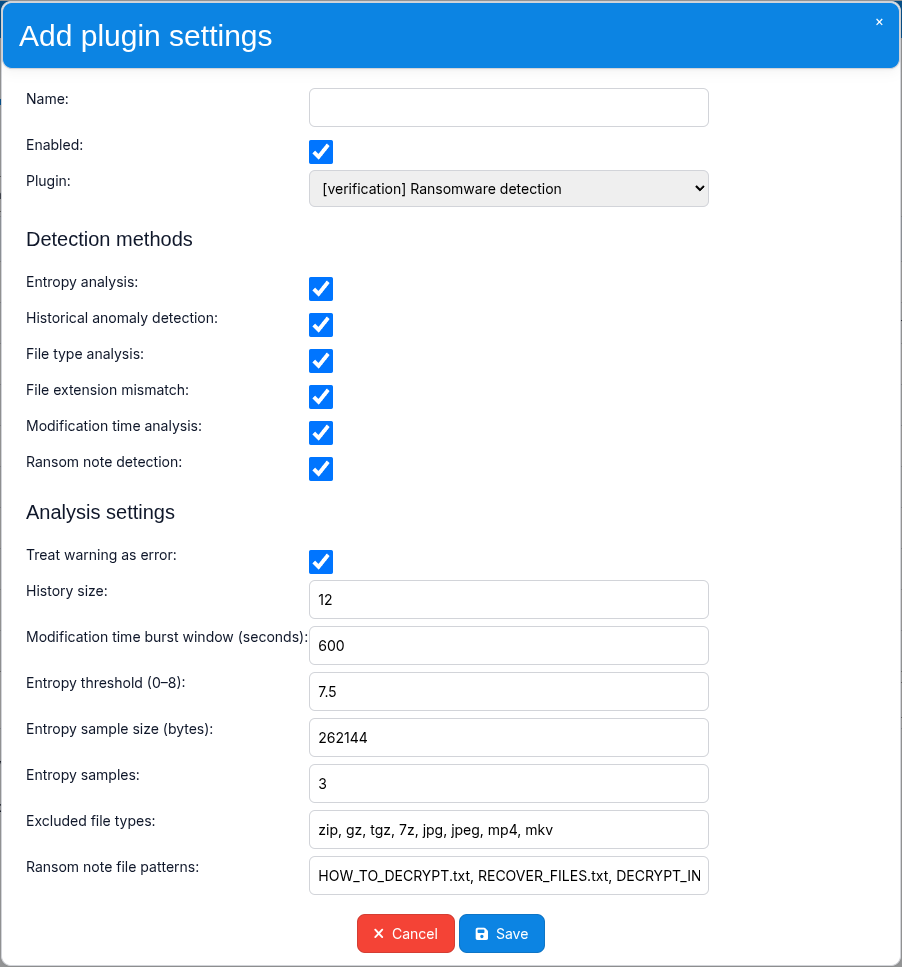
Configuration#
The Ransomware Detection checker can be configured using a named checker configuration.
The configuration is divided into two groups:
Detection methods - enables or disables individual ransomware detection methods.
Analysis settings - controls how the enabled methods work and how the final result is interpreted.
The default configuration enables all available detection methods, including historical anomaly detection.
Detection methods#
The following detection methods can be enabled or disabled independently:
Entropy analysis-
Enables entropy analysis of restored files.
Historical anomaly detection-
Enables comparison of selected current analysis metrics with historical verification results.
File type analysis-
Enables analysis of generic or unrecognized detected file types.
File extension mismatch-
Enables comparison between file extensions and detected file content types.
Modification time analysis-
Enables detection of mass file modification activity within a configured time window.
Ransom note detection-
Enables matching restored file names against configured ransom note patterns.
All detection methods are enabled by default.
Analysis settings#
Treat warning as error-
Controls whether a checker result with the
WARNINGstatus causes the verification check to fail.Default:
enabled History size-
Defines the maximum number of historical checker results retained for historical anomaly analysis.
Default:
12 Modification time burst window (seconds)-
Defines the time window used by modification time analysis. Files with modification times close to the latest modification time are counted within this window.
Default:
600 Entropy threshold (0-8)-
Defines the entropy value from which a file is classified as a high-entropy file.
Default:
7.5 Entropy sample size (bytes)-
Defines the amount of data read for each entropy sample.
Default:
262144 Entropy samples-
Defines the number of samples taken from an eligible file during entropy analysis.
Default:
3 Excluded file types-
Defines file types that are excluded from supported analysis methods where file-type exclusions apply.
Default:
zip, gz, tgz, 7z, jpg, jpeg, mp4, mkv
Ransom note file patterns-
Defines file-name patterns used by ransom note detection. Multiple patterns are separated by commas and may contain wildcards.
Default:
HOW_TO_DECRYPT.txt, RECOVER_FILES.txt, DECRYPT_INSTRUCTIONS.*, README_DECRYPT.*
Small file sets#
Historical anomaly detection uses percentage-based metrics to compare the current verification result with previous baseline data.
For very small file sets, a change to a single file can represent a relatively large percentage of the analyzed data. This can make historical anomaly detection more sensitive than it would be for larger data sets.
When historical anomaly detection is enabled and a single file represents at least 1% of the scanned file set, the checker adds a note to the verification result informing the administrator about the increased sensitivity.
This does not change the score or verification status. It is provided only as additional context for interpreting the result.
If this level of sensitivity is not desired for a small data set, historical anomaly detection can be disabled in the checker configuration.
Examples#
A healthy and stable data set may produce a result such as:
PASS (score: 0)
A moderate anomaly may produce a warning:
WARNING (score: 3)

Reasons:

 - Increase in high-entropy file ratio (+2)
 - Multiple anomaly indicators observed: high entropy ratio,
   mass file modification activity (+1)
Several correlated indicators may produce a failure:
FAIL (score: 7)

Reasons:

 - Large increase in high-entropy file ratio (+3)
 - Increase in generic/unrecognized file type ratio (+2)
 - Multiple anomaly indicators observed: high entropy ratio,
   generic/unrecognized file types, mass file modification activity (+2)
The exact score depends on the enabled detection methods, current data characteristics, and, when enabled, the historical baseline.
Notes and limitations#
The Ransomware Detection checker is designed to detect indicators that may be associated with ransomware activity. It is not an antivirus or malware scanner and does not identify specific ransomware families.
The checker is intended for detection and verification, not prevention. It analyzes restored backup data and helps identify suspicious changes that may require administrator investigation.
A single indicator is not necessarily evidence of ransomware. High entropy, generic file types, extension mismatches, or clustered modification times can also occur in legitimate data. The checker combines multiple methods and, optionally, historical comparison to reduce reliance on individual characteristics.
Only regular files are analyzed. Directories, symbolic links, and other non-regular file-system objects are skipped.
Entropy analysis, file type analysis, and file extension mismatch analysis can
be affected by the types of data stored in the analyzed directory. The
Excluded file types setting can be used to exclude supported file types
that naturally produce less useful signals.
Modification time analysis depends on the metadata visible on the Restore Destination. Some file systems, network file systems, mount options, or caching behavior may affect modification-time values.
Historical anomaly detection is based on previous verification results eligible for baseline use. Changes to the checker configuration that affect historical analysis are kept separate from incompatible historical data.
The checker should be treated as an additional verification mechanism and one source of information for the administrator. Suspicious results should be investigated together with other available information about the protected environment.