
Restore Destinations#
Introduction#
A Restore Destination is a Restore Verification configuration object that defines the environment in which restore and verification tests are performed.
A Restore Destination determines not only where data is restored, but also which restore modes and verification capabilities are allowed in that environment.
A single Restore Destination can be reused by multiple Restore Tests.
Configuration#
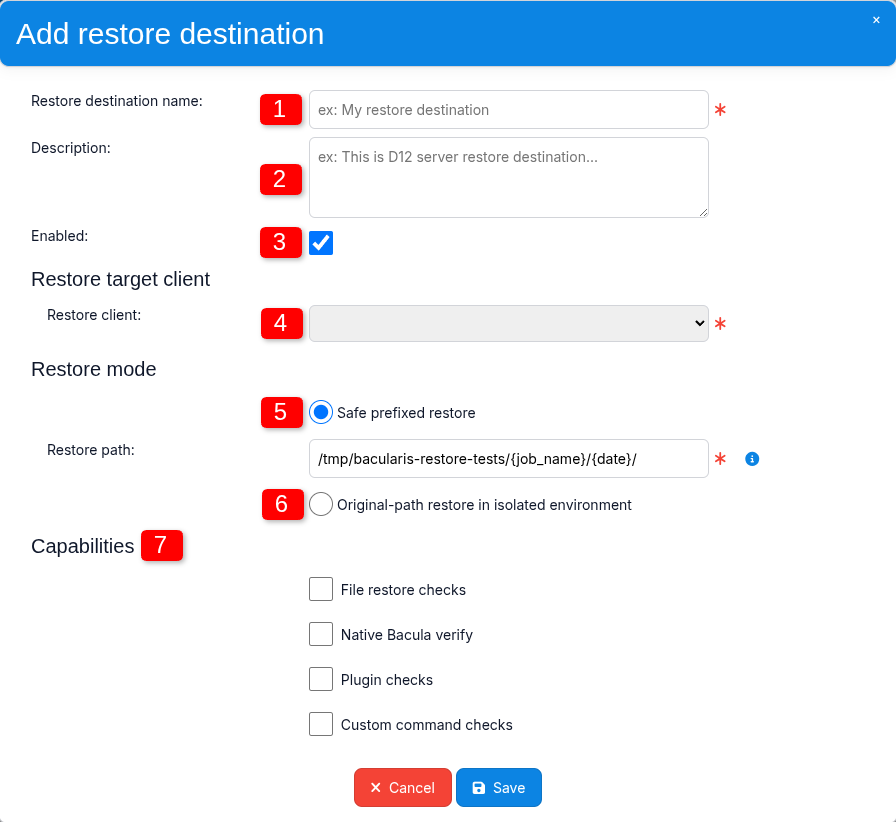
1. Restore destination name#
Defines the name used to identify this Restore Destination in Restore Tests and other Restore Verification configuration views.
2. Description#
An optional description of the restore environment, for example its purpose, host role, or intended type of verification.
3. Enabled#
The Enabled option allows a Restore Destination to be temporarily disabled without removing its configuration.
This can be useful when the test environment is temporarily unavailable, undergoing maintenance, or should not be used for restore testing for another reason.
When disabled, the Restore Destination remains configured, but Restore Tests cannot use it until it is enabled again.
4. Restore client#
Defines the Bacula Client to which Restore Verification data will be restored and where the restored data will be verified.
This should normally be a client dedicated to restore testing.
Important
Use a dedicated test client whenever possible. Restoring verification data to a production client may overwrite or interfere with existing data, especially when original-path restore is used.
5. Safe prefixed restore#
In this mode, restored data is redirected below the configured restore prefix instead of being written to its original locations.
The restore prefix is defined in the Restore path field.
This is the recommended restore mode for Rule-based Verification.
The Restore path can contain keywords that are replaced with actual values when the restore runs.
Available keywords include:
{date}– current date, for example2026-08-19_00:29:18{test_id}– Restore Test identifier, for examplert-OjuKleyqh423W5wHGcr0JARiUVm9EzgN{job_name}– Backup Job name, for exampleMy Job 123{restore_test}– Restore Test name, for exampleMyRestoreTest{restore_job}– Restore Job name, for exampleRestoreFiles{restore_policy}– Restore Policy name, for exampleDailyCycle{restore_destination}– Restore Destination name, for exampleServerA3
Example
Configured path:
/tmp/bacularis-restore-tests/{job_name}/{date}/
Actual path:
/tmp/bacularis-restore-tests/My Job 123/2026-08-19_00:29:18/
Important
Safe prefixed restore is supported with Rule-based Verification. Native Bacula Verify requires original restore paths and therefore cannot use a restore prefix.
6. Original-path restore in isolated environment#
This mode restores data to its original locations on the test client.
For example, if a file was stored at the following path when the backup was created:
/home/bill/my_file.txt
the file will be restored to the same path on the client selected in Restore client.
Warning
This mode should be used only on an isolated test client. Restoring files to their original paths on a production client may overwrite existing data.
Important
This Restore Destination mode is intended primarily for tests using Native Bacula Verify. It allows a Verify Job with the DiskToCatalog level to compare file-system attributes with metadata stored in the Bacula Catalog.
For this reason, original-path restore is required for Native Bacula Verify. This verification method cannot work with a prefixed restore path.
The verification method is selected when configuring a Restore Test.
7. Capabilities#
Capabilities declare which types of Restore Verification checks the destination is prepared and allowed to perform.
Four capabilities are supported:
File restore checks – indicates that the Restore Destination can perform file-level checks such as existence, size, type, checksum, and other file attributes.
Native Bacula verify – indicates that the Restore Destination can perform Native Bacula Verify tests using original restore paths and a Verify Job. This capability requires an original-path restore environment.
Plugin checks – indicates that the destination is prepared to verify data restored from backups created by Bacula plugins, for example database backups.
Custom command checks – covers verification types that do not belong to the other capability categories. It is intended for verification workflows implemented through custom commands or scripts.
If a Restore Test requires a capability that is not enabled for the selected Restore Destination, the test is not performed on that destination.
When such a Restore Test is started, the Admin Job representing the Restore Test finishes with an error. Bacularis also records a corresponding warning in the Audit log explaining that the selected Restore Destination does not provide the required capability.
For example, a database restore test cannot be performed on a Restore Destination that provides only the File restore checks capability.
Using multiple Restore Destinations#
Larger environments can define separate Restore Destinations for different verification purposes.
For example:
one destination for Rule-based file checks,
one isolated destination for Native Bacula Verify,
one destination prepared for database restore testing.
This makes it possible to separate different types of restore testing and prepare each environment specifically for the verification tasks it is expected to perform.
One destination, multiple Restore Tests#
A Restore Destination is reusable and can be assigned to multiple Restore Tests.
This makes it possible to maintain a shared test environment without duplicating its configuration.
There is no fixed limit on the number of Restore Tests that can reference the same Restore Destination.
Safety considerations#
Prefer a dedicated test client.
Use Safe prefixed restore whenever original paths are not required.
Use Original-path restore in isolated environment only on an isolated test client.
More information: Security and Best Practices