Restore Verification
Be confident your backups can be restored
A successful backup is important, but it does not tell you whether the data can actually be restored when you need it.
Restore Verification in Bacularis helps automate this process. It can restore backup data to a prepared test environment, verify the restored data, and report whether the test completed successfully.
Backup is preparation. Restore is proof.
How Restore Verification works
Restore Verification brings the restore and verification process together in an automated workflow:
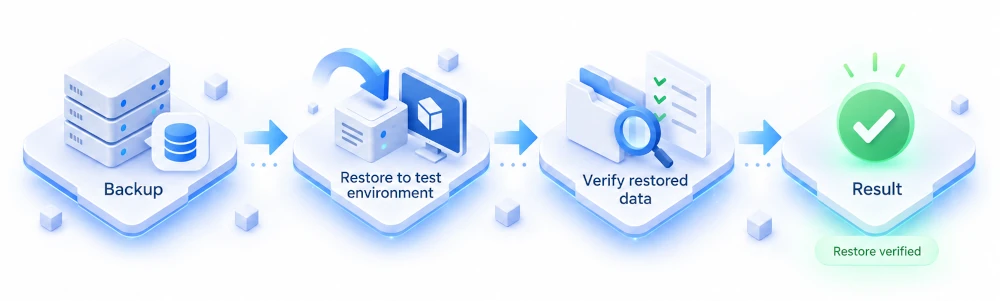
You choose what should be tested, where the data should be restored, how it should be verified, and when the test should run.
Bacularis takes care of running the restore test and presenting its result.
Why verify your restores?
A green backup status confirms that a backup job completed successfully. It does not confirm that the data can actually be restored.
In our introductory article, we explain why restore testing is an important part of data protection and the idea behind Restore Verification.
The green check mark is not enough: Why a successful backup is only part of the story
Verification methods
Bacularis provides two methods for verifying restored data.


Getting started
We have prepared a step-by-step video series to help you configure and use Restore Verification.
Watch the Restore Verification playlist →
Part 1 - Preparation
Before running your first restore test, you need to prepare the environment.
In this video, we show how to prepare a restore destination host, configure Bacularis API and the Bacula Client, and create the Bacula resources required by Restore Verification, including a restore job, restore policy, and an optional Verify Job.
Watch the video:
Part 2 - Rule-based Verification
In the second part of the series, we configure a complete Restore Verification test using Rule-based Verification.
You will see how to create verification rules, configure a restore test, run it, check the results, and see what happens when a verification test fails.
Watch the video:
Part 3 - Native Bacula Verify
In the third part of the series, we configure a complete Restore Verification test using Native Bacula Verify.
You will see how to prepare a restore destination, configure a restore test, set up a Bacula Backup Job for verification, run the test, check the results, and see what happens when a verification test fails.
Watch the video:
One more guide is coming
The final part of the series will cover troubleshooting Restore Verification tests.
Documentation
For complete information about Restore Verification, configuration options, verification methods, and individual components, see the Bacularis documentation: