Introduction
Welcome to the Bacularis quick start guide.
Follow the steps below to install and start using Bacularis.
Bacularis does not modify your Bacula configuration during setup and can operate in read-only mode.
1. Get access to the package repository
To access the Bacularis binary package repositories (DEB, RPM), please register at Bacularis.com:
Bacularis.com packages
2. Log in to the Bacularis.com user panel
After logging in, go to the Packages page.
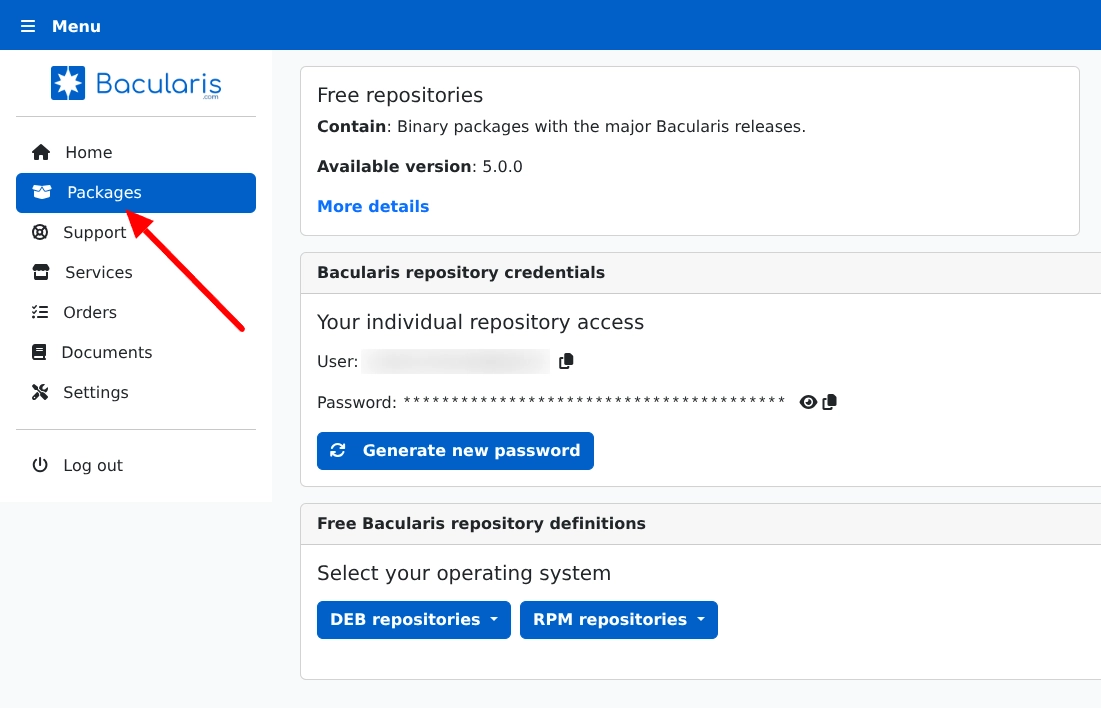
3. Add the repository on your Bacula Director host
Select your operating system and copy/paste the repository instructions into the console on your Bacula Director host as root. If you do not already have Bacula Director installed, select the host where you plan to install it.
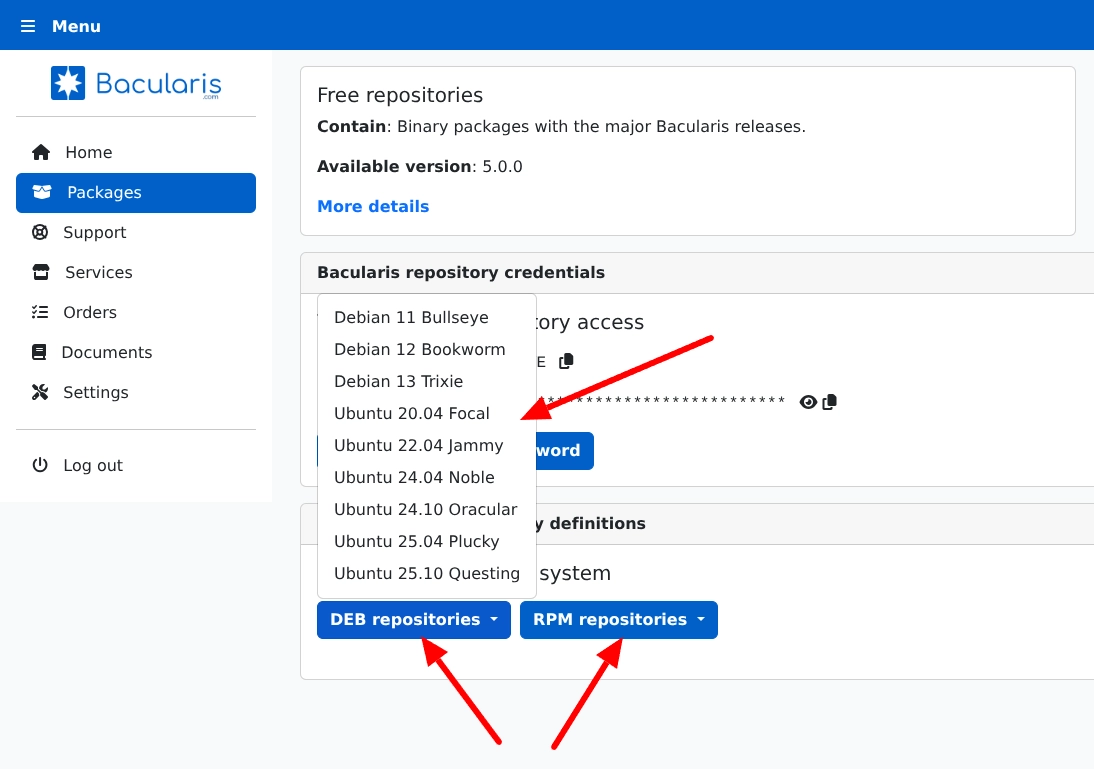
4. Install Bacularis
DEB-based systems:
apt install bacularis bacularis-nginx
ln -s /etc/nginx/sites-available/bacularis.conf /etc/nginx/sites-enabled/
RPM-based systems:
dnf install bacularis bacularis-nginx bacularis-selinux
5. Restart the web server
systemctl restart nginx
6. Open the web interface
Open your browser and go to:
http://YOUR_HOST_ADDRESS:9097
Default credentials (first login):
- User: admin
- Password: admin
7. Go through the installation wizard
7.1 Step 1 – General
Select whether you already have a Bacula environment installed.
7.2 Step 2 – Catalog
Enter your Bacula database connection parameters.
Click Test to verify the connection to the Bacula catalog.
Advanced
Note: PostgreSQL databaseIf the connection test fails with an Ident authentication error, add the following rule at the top of your pg_hba.conf
(example for: database bacula, user bacula, local connection):
# TYPE  DATABASE  USER    ADDRESS         METHOD
host    bacula    bacula  127.0.0.1/32    scram-sha-256
Or if your PostgreSQL server uses MD5 password encryption, use this instead:
Copy# TYPE DATABASE USER ADDRESS METHOD host bacula bacula 127.0.0.1/32 md5
Then reload PostgreSQL:
Copysystemctl reload postgresql
Note: Bacularis does not support PostgreSQL connection with empty password. If you use empty password, please set password ALTER USER bacula PASSWORD 'YourPass123';
7.3 Step 3 – Console
Add sudo rules to allow Bacularis to access bconsole.
DEB-based systems:
echo "www-data ALL = (root) NOPASSWD: /usr/sbin/bconsole" > /etc/sudoers.d/bacularis
RPM-based systems:
echo "apache ALL = (root) NOPASSWD: /usr/sbin/bconsole" > /etc/sudoers.d/bacularis
Click Test to verify the bconsole connection.
7.4 Step 4 – Configuration
At this step, Bacularis uses read-only access to the Bacula configuration.
No configuration files are modified.
Add sudo rules for Bacula JSON tools access.
DEB-based systems:
echo "www-data ALL = (root) NOPASSWD: /usr/sbin/bdirjson
www-data ALL = (root) NOPASSWD: /usr/sbin/bsdjson
www-data ALL = (root) NOPASSWD: /usr/sbin/bfdjson
www-data ALL = (root) NOPASSWD: /usr/sbin/bbconsjson" >> /etc/sudoers.d/bacularis
RPM-based systems:
echo "apache ALL = (root) NOPASSWD: /usr/sbin/bdirjson
apache ALL = (root) NOPASSWD: /usr/sbin/bsdjson
apache ALL = (root) NOPASSWD: /usr/sbin/bfdjson
apache ALL = (root) NOPASSWD: /usr/sbin/bbconsjson" >> /etc/sudoers.d/bacularis
Click Test to verify access to the Bacula JSON tools.
7.5 Step 5 – Authentication
Set your new Bacularis administrator username and password.
7.6 Step 6 – Finish
Review the summary and save the wizard.
Log in to the web interface.
If you can see your Bacula jobs, everything is working correctly.
The quick start uses safe, read-only defaults. Advanced features can be enabled later when you are ready.
Select your operating system.
Enter your system administrator username and password.
If you use sudo privileges, enable the Sudo checkbox.
Click Test to verify the connection.
Click Install Bacula to start the installation process.
You will see the installation progress in the window.
Advanced
Note: This process is repeatable
If something goes wrong, fix the issue and run the installer again.
Advanced
Note: RPM-based systems
When using older Bacularis versions, installation may fail due to missing SELinux rules. If possible, temporarily disable SELinux during installation or update Bacularis.
After the process finishes, close the window.
The wizard will automatically continue to Step 5.
7.2 Step 5 – Authentication
Set your new Bacularis administrator username and password.
7.3 Step 6 – Finish
Review the summary and save the wizard.
Log in to the web interface.
Your Bacula and Bacularis environment is now fully configured and ready to use.
You can run your first backup job.
8. What’s next?
After completing the quick start, you may want to continue with the following steps:
- Learn how to allow Bacularis to write Bacula configuration
- Install a TLS/SSL certificate to secure web access
- Watch Bacularis video tutorials to explore more features
- If you encounter any issues, join the Bacularis User Group forum to get help
- Read the Bacularis documentation for advanced and alternative setup options
9. Helpful for start
Here you will find recommended videos for both new Bacula users and experienced administrators.